I haven’t test it yet but taking a slightly to large range should work
This unfortunately is not possible, IBKR prevents it with this error message “Date range cannot exceed 365 days.” I have tried a curl with adjusting time range, that seems to work, but is not a nice solution at all. I have raised a ticket with their support. Also asked for an option “Last year” for the flex query export.
can you find some way to share your changes and/or example files?
FWIW there are also projects on github that take the IBKR input and then drive the web UI using automated browsing to achieve this. (and LLMs are getting near the point where this does not need any specialized software at ALL)
Any links? This was my original idea. I guess with LLM computer use, it is possible to do with LLMs, but that is somewhat inefficient. I was thinking originally of using Playwright/debug interface or manipulating the webpage.
OK, I am ready to give it a try. To my shame I have to say that I did never use GitHub.
What I did so far: install pip. Didn’t work on linux mint, found some pointers to pipx and that apparently worked, “pipx install ibflex2”
Next I suppose I need to create a certain XML report in IBKR with Flex Query. The help in GitHub mentions “Reports > Flex Queries > Custom Flex Queries > Configure”, I only have “Activity” or “Trade Confirmation Flex Query”.
Does any kind soul have a sample what should be configured in the Flex Query? Or better still, a step by step instruction for a dummy like me?
Regarding Flex Query: There is detailed description. For my case, have selected all field for the specified key sections. It took me a some minutes to set it up, but once you have set it up, you can use it for any yearly exports.
There is also a general user guide for an overview. Overall, there is quite some docs, but needs some time to read. Some thing can probably be streamlined in the future a bit. If you feel like things could be written in a better way, just open an issue or pull request at GitHub. Or ask here in the forum.
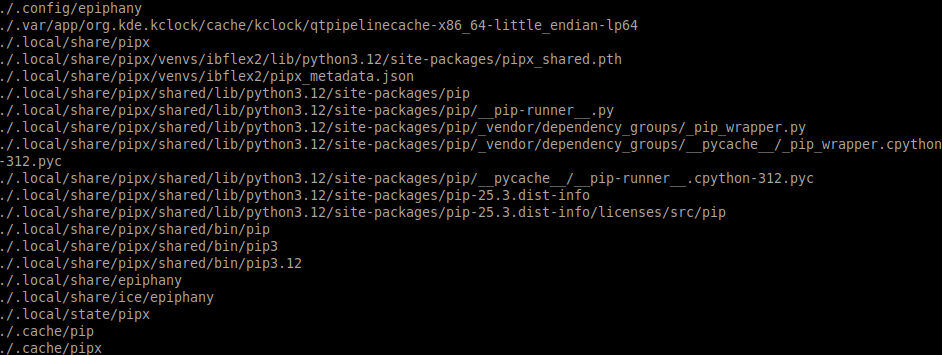
The installation of pipx install ibflex2 did create directories .local/share/pipx and .local/share/venvs I think
Still need to download the Kursliste and probably import it into a database.
Thanks for your help. I have absolutely no experience with Python and I am not sure if the risk of running foreign programs on my Computer is worth the 30 CHF (I got it cheaper) that datalevel charges. I’ll use a dummy account with no access to nothing…
Downloading the kursliste into the data/kursliste should do it for a one-off job. It takes a few minutes to extract data, but I assume this is fine.
I am not sure if the risk of running foreign programs on my Computer
All of this is open source on GitHub, if you are interested in details, you can check the code.
30 CHF (I got it cheaper) that datalevel
Is this a one-off fee, or a yearly one?
Anyways, in case of datalevel, you are giving them access (read-only I hope) to your IBKR account. In case of a data leak, it could at least be exposed that you are an IBKR customer.
I think it is up to everybody own decision what level of comfort and trust they chose. It is nice that we have this year at least 2 ways to import IBKR data via e-steuerauszug into tax return software while there used to be none such way for the past years.
If you decide to generate a report with opensteuerauszug and later on get the datalevel one, it would be very interesting if you could share the differences.
You don’t give them account credentials, there is some kind of read only access you can give them. So up to you what you trust and want to pay (or fix which you may not be able to with data level), but they can’t just separate you from your brokerage money.
Sorry, I did never ever in my life run a Python script. My system tells me that I need to use the command python3. So I do
python3 -m opensteuerauszug.steuerauszug ./ibkr_2025.xml --importer ibkr --tax-year 2025 -o output.pdf
/usr/bin/python3: Error while finding module specification for 'opensteuerauszug.steuerauszug' (ModuleNotFoundError: No module named 'opensteuerauszug')
Interesting: there is another error if I use a non-existent module:
python3 -m dummy ./ibkr_2025.xml --importer ibkr --tax-year 2025 -o output.pdf
/usr/bin/python3: No module named dummy
Also I wonder where I have to tell the script where the kursliste xml is…
Place the downloaded Kursliste XML file(s) into the data/kursliste/ directory within your OpenSteuerAuszug project
What is the OpenSteuerAuszug project, is that the current directory where the other files are? I’ll try. Did a find on my home but couldn’t find any directory named OpenSteuerAuszug…
And place the XML file into data/kursliste of the checkout directory of opensteuerauszug (“OpenSteuerAuszug project” refers to the checkout directory of opensteuerauszug, most probably all lowercase).
Thanks.
What is the checkout directory of opensteuerauszug? I did a find and could not find any directory with that name.
Also pip did not work, I had to use pipx.
Maybe ibflex2 is the directory I need? Tried your commands there, source worked but no success with install:
pipx install .[dev]
ERROR: Directory '/home/user/.local/share/pipx/venvs/ibflex2[dev]' is not installable. Neither 'setup.py' nor 'pyproject.toml' found.
Cannot determine package name from spec '/home/user/.local/share/pipx/venvs/ibflex2[dev]'. Check package spec for
errors.
Maybe some kind soul could give me a sequence of commands for linux that works…
You did a clone git clone from GitHub I assume (checking out the sources to your local compuer). Change into that folder (by default it is named opensteuerauszug). Run all the commands in that folder, no need to switch folders.
Also pip did not work, I had to use pipx.
Here I cannot help, for me, pip does work. I am not sure about the differences.
Mit dem Lesen und der Teilnahme an diesem Forum bestätigst du, dass du die Forum-Richtlinien gelesen hast und damit einverstanden bist sowie den Haftungsausschluss auf http://www.mustachianpost.com/de/ akzeptierst.