That’s for shares not publicly traded. Otherwise, taxation is based on market prices or lower. And why should they undervalue publicly traded shares (as they do with RE)?
Who knows why, but until 2023, Basel-Land maintained their own Kursliste with values that could be very different from the market value. Thankfully, now they use the same ICTax database.
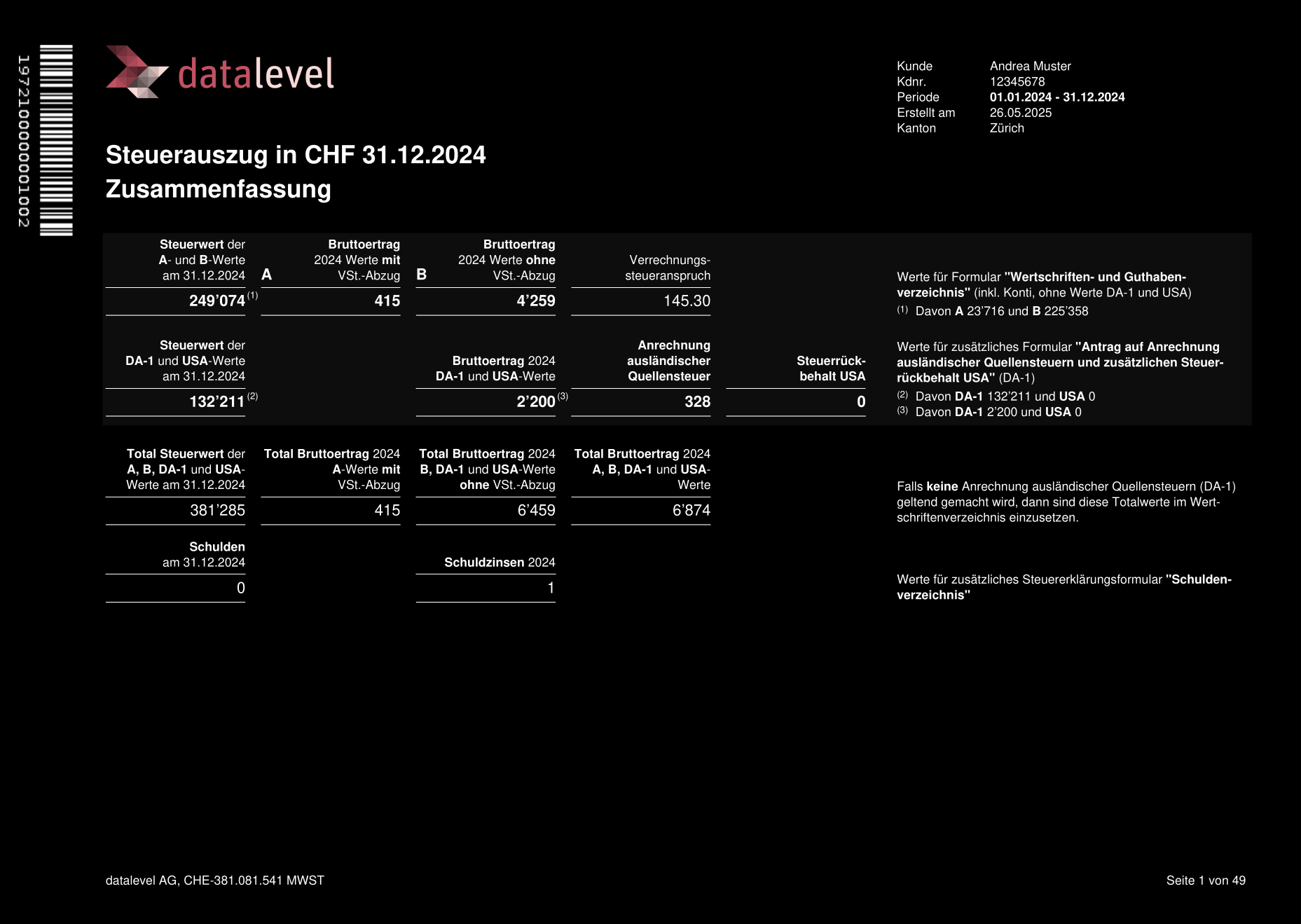
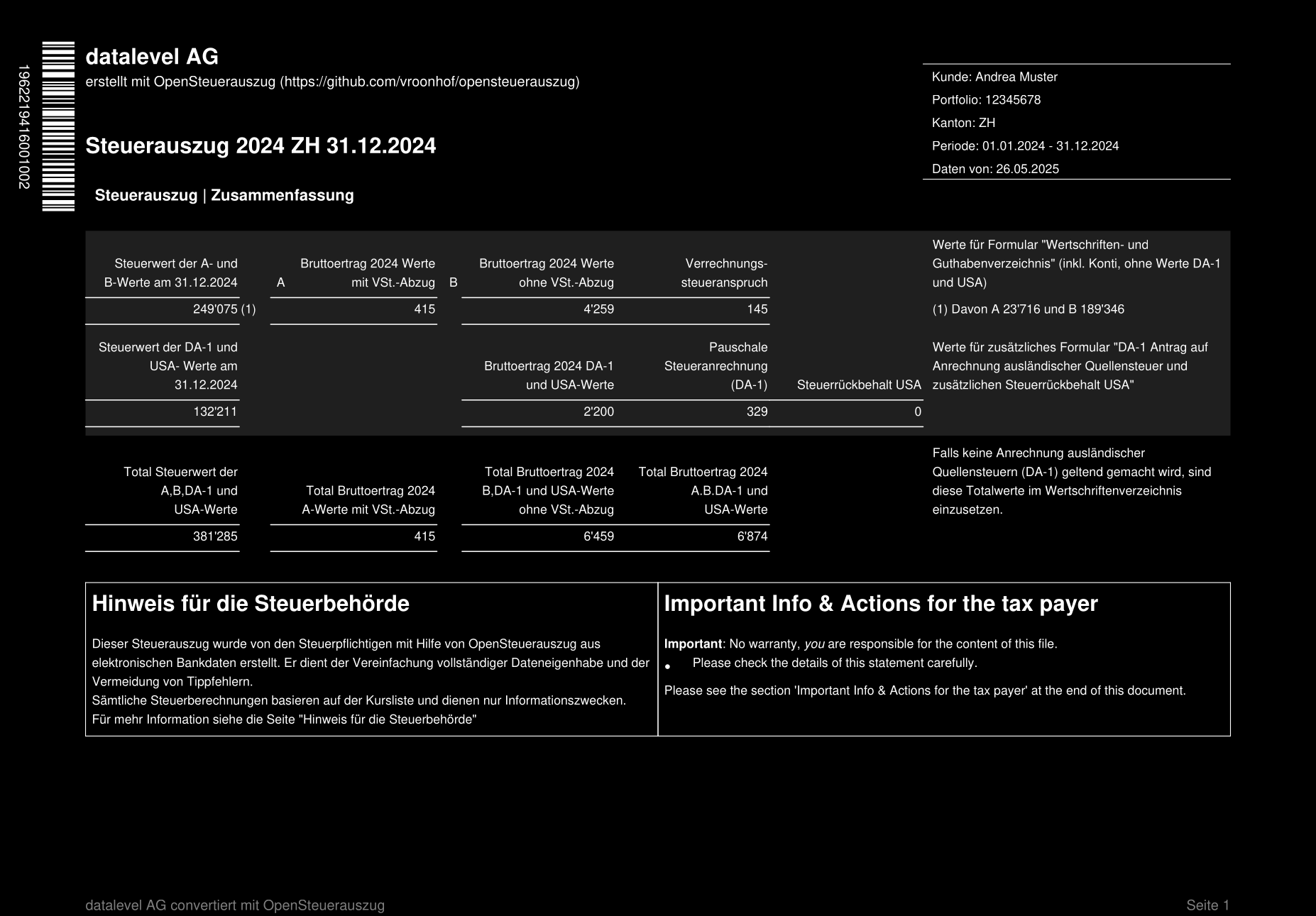
@PhilMongoose This looks very promising! Thanks for sharing. I assume you will push those changes as a pull request to opensteuerauszug once ready?
Btw, have you tried to convert this XML with the script posted above using the official taxstatement.jar? If that works, we could focus now mainly on getting the XML fully complaint with opensteuerauszug (without validation errors using the official validation tool), and use the official tool for the XML to PDF conversion for the time being. Of course, in the long run, it would be great to also have a stable and nice open source tool for the XML to PDF conversion. The official code looks quite bad… At least from looking into the jar using IntelliJ for understanding the API. I will post more details about that one later - there is quite some stuff “hidden” in the JAR. 
1 Like
Yes, I’m able to create a PDF from it. I’ll try to find somewhere to upload it as PDFs are not allowed here.
If you can share what you found on the JAR that would be helpful. Also, if you have existing XMLs for me to try, I can run them.
@PhilMongoose I have updated the above posted script. I think I have found the tool which is used by tax software to extract the XML from the PDF file (you also need to download more libs). I think that can be useful to test PDFs created with opensteuerauszug.
In addition, I have also added a parameter which allows setting the language of the PDF created.
So far, I have not found any other (official) XML files which we could test. I think we depend on our own real ones from different banks, which we can extract using the tool, and the generate with both official PDF generator and opensteuerauszug one, and make them match as much as possible.
Btw, while comparing your screenshots from above, I have noted that the barcode on the left has different numbers (not sure if this mattes, but I would assume this is somewhere in the spec). Also the rounding looks different (I assume we should apply rounding similar to the tax declaration software, which is half-up if I remember correctly).
I’ve already written my own extractor tool. It’s what I used to extract the datalevels XML and use to test PDF generation:
My Python Extractor
import sys
import zlib
import fitz  # PyMuPDF
import zxingcpp
from PIL import Image
import numpy as np
import xml.dom.minidom

def try_decompress(byte_data):
    """Helper to try decompressing data using ZLIB or Raw Deflate."""
    try:
        # 1. Try Standard ZLIB
        return zlib.decompress(byte_data).decode('utf-8')
    except zlib.error:
        try:
            # 2. Try Raw Deflate (no header)
            return zlib.decompress(byte_data, -15).decode('utf-8')
        except zlib.error:
            return None

def extract_ech0196_xml(pdf_path, output_xml_path):
    try:
        doc = fitz.open(pdf_path)
    except Exception as e:
        print(f"Error opening PDF: {e}")
        return

    total_pages = len(doc)
    print(f"Processing {pdf_path} ({total_pages} pages) scanning BACKWARDS...")

    # Dictionary to hold barcodes grouped by page
    # Structure: { page_index: [ {y, x, bytes}, ... ] }
    pages_data = {}
    found_data_previously = False

    # --- 1. SCANNING PHASE (Backwards: Last Page -> First Page) ---
    for page_num in range(total_pages - 1, -1, -1):
        page = doc[page_num]

        # Render high-res (3x zoom)
        zoom = 3
        mat = fitz.Matrix(zoom, zoom)
        pix = page.get_pixmap(matrix=mat)

        # Convert to Grayscale
        img_data = np.frombuffer(pix.samples, dtype=np.uint8).reshape(pix.h, pix.w, pix.n)
        if pix.n == 4: img_pil = Image.fromarray(img_data, 'RGBA').convert('L')
        elif pix.n == 3: img_pil = Image.fromarray(img_data, 'RGB').convert('L')
        else: img_pil = Image.fromarray(img_data, 'L')

        # Auto-Rotation Check (0, 90, 180, 270)
        best_page_barcodes = []
        for angle in [0, 90, 180, 270]:
            rotated_img = img_pil.rotate(angle, expand=True)
            results = zxingcpp.read_barcodes(rotated_img)
            pdf417 = [r for r in results if r.format == zxingcpp.BarcodeFormat.PDF417]

            if len(pdf417) > len(best_page_barcodes):
                best_page_barcodes = []
                for result in pdf417:
                    best_page_barcodes.append({
                        'page': page_num,
                        'y': result.position.top_left.y, # Y relative to rotated image
                        'x': result.position.top_left.x,
                        'bytes': result.bytes
                    })

        # --- OPTIMIZATION LOGIC ---
        if best_page_barcodes:
            # Sort this specific page's barcodes strictly Top-to-Bottom (Y-axis) initially.
            # We will handle the "Bottom-Up" reversal in the strategy phase.
            best_page_barcodes.sort(key=lambda b: b['y'])

            pages_data[page_num] = best_page_barcodes
            print(f"Page {page_num + 1}: Found {len(best_page_barcodes)} barcodes.")
            found_data_previously = True
        else:
            # Stop if we leave the appendix section
            if found_data_previously:
                print(f"Page {page_num + 1} has no barcodes. Stopping scan (Early Exit).")
                break

    if not pages_data:
        print("No PDF417 barcodes found.")
        return

    total_count = sum(len(v) for v in pages_data.values())
    print(f"Total barcodes collected: {total_count}")

    # --- 2. DECOMPRESSION STRATEGY ---

    sorted_page_nums = sorted(pages_data.keys()) # Ascending list of pages found (e.g., 188..198)

    def build_stream(page_order_list, reverse_internal_order):
        """Helper to build the byte stream based on page order and internal page sort"""
        stream = b""
        for p_num in page_order_list:
            barcodes = pages_data[p_num] # These are currently stored Top-Down
            if reverse_internal_order:
                # Flip to Bottom-Up
                stream += b"".join([b['bytes'] for b in reversed(barcodes)])
            else:
                # Keep Top-Down
                stream += b"".join([b['bytes'] for b in barcodes])
        return stream

    strategies = []

    # --- PRIORITY 1: PURE REVERSE
    # Page Order: Descending (198 -> 188)
    # Internal Order: Bottom-Up (Reversed Y)
    strategies.append(("Pure Reverse (Descending Pages, Bottom-Up)", build_stream(reversed(sorted_page_nums), True)))

    # --- Fallbacks ---
    # Strategy 2: Stack Reverse (Descending Pages, Top-Down)
    strategies.append(("Stack Reverse (Descending Pages, Top-Down)", build_stream(reversed(sorted_page_nums), False)))

    # Strategy 3: Standard (Ascending Pages, Top-Down)
    strategies.append(("Standard (Ascending Pages, Top-Down)", build_stream(sorted_page_nums, False)))

    # Strategy 4: Mixed (Ascending Pages, Bottom-Up)
    strategies.append(("Mixed (Ascending Pages, Bottom-Up)", build_stream(sorted_page_nums, True)))

    print("Attempting to decode (Prioritizing Pure Reverse)...")

    xml_str = None
    for name, data_bytes in strategies:
        result = try_decompress(data_bytes)

        if result:
            print(f"SUCCESS! Decoded using strategy: {name}")
            xml_str = result
            break

    # --- 3. OUTPUT ---
    if xml_str:
        try:
            dom = xml.dom.minidom.parseString(xml_str)
            pretty_xml = dom.toprettyxml()
            with open(output_xml_path, "w", encoding="utf-8") as f:
                f.write(pretty_xml)
            print(f"XML extracted successfully to: {output_xml_path}")
        except Exception as e:
            print(f"Decompression valid, but XML parsing failed: {e}")
            with open(output_xml_path, "w", encoding="utf-8") as f:
                f.write(xml_str)
            print("Saved raw text output.")
    else:
        print("\nFailed to decode using any strategy.")
        # Dump the priority attempt for debugging
        with open("debug_fail_payload.bin", "wb") as f:
            f.write(strategies[0][1])
        print("Saved 'debug_fail_payload.bin' (Pure Reverse) for analysis.")

if __name__ == "__main__":
    if len(sys.argv) < 3:
        print("Usage: python extract_tax_final.py <input_pdf> <output_xml>")
    else:
        extract_ech0196_xml(sys.argv[1], sys.argv[2])
2 Likes
@PhilMongoose Have you seen the extraction tool in opensteuerauszug/scripts/decode.py? I have not tested it, but I think that should also do the job.
My point was that we can try the official extraction tool to be extra sure that our PDFs can be extracted with official tax software.
2 Likes
I haven’t seen it, either of the extractors, but it would make sense to test against the official one for compatibility.
This is awesome.
Tried it yesterday, found a (tiny) bug, wrote a fix and it’s already merged 
The biggest annoyance I had was getting IBKR to spit out the Flex report Just Right, took me seven tries 
2 Likes
I took the lazy option of ‘select all’ and filtered on the code end.
@PhilMongoose Is this something you can share? It would be interesting for me as well, it failed because of additional fields in my case and I did not dig into it yet.
I also noticed one limitation in IBKR flex exports: you can only select business days. This works fine for 2025 and 2024, but for 2023 it is not possible to do a full export from 1.1. to 31.12.. Any workarounds for this (would also not work in 2027 and 2028)?
Edit: I have now tried to convert the “kursliste” to sqlite, but it fails for me:
python scripts/convert_kursliste_to_sqlite.py data/kursliste/kursliste_2024.xml data/kursliste/kursliste_2024.sqlite

Error: Conversion failed: An unexpected error occurred while processing data/kursliste/kursliste_2024.xml: root element not found (actual: {http://xmlns.estv.admin.ch/ictax/2.2.0/kursliste}
kursliste, expected: {http://xmlns.estv.admin.ch/ictax/2.0.0/kursliste}kursliste)
Does that work for anybody? I have just downloaded the latest zip from ESTV and extracted.
You should download the right version (2.0?)
1 Like
You are of course right - thanks! That did the job.
Somehow I ignored the 2.0 in the docs, just read the first part.
Always down the latest file marked “Initial” in the latest format, V2.0 at this time).
HI Phil. I see fell in the same rabit hole as me. Who said tax returns were boring. can you find some way to share your changes and/or example files? I don’t mind if you just dump it all in a github issue. I don’t have the cred in this forum to DM you yet.
The formatting of the opening value was intentional. At least in two of the examples I have from real banks it is done that way.
1 Like
I have been trying to find a non-ugly way to do this.
see also
Yes, unfortunately, I didn’t plan it well and mixed in all my personal data and non-shareable files like the jars above.
Once I have a moment, I’ll separate it out and then push it to github. You can then cherry-pick any changes you want.
I haven’t test it yet but taking a slightly to large range should work (for schwab you can only download statements for the current data so the code already knows how to recalculate for EOY). in fact at the moment even too short would work because I don’t think anything checks the IBKR statement goes the full range
I never used the eStatement before and wanted to check: when you upload it, does it fill the values in the tax software?
I was thinking whether it is possible to use this purely as an input mechanism e.g. you upload, let it populate the software, then later remove the attachment and if necessary make any manual changes and then upload the IBKR statement instead.
Yes, but only as a one-liner, for example for a depot of various stocks and savings accounts, just one line, total value on 31.12, total interest/div. paid in year with and without wht, 15% US etc.
It doesn’t fill out all individual stocks separately as if one would fill out declaration manually.
3 Likes