I’d just close off all internet access and allow only Tailscale/Wireguard access. This will then prevent all the annoying failed logins filling up your logs.
But that would also close off all my services to my friends and family. No Jellyfin streaming, no file sharing from my server.
Well, if they are on the home network, they will still be able to access it.
If they are outside the network, they just need to be install Tailscale/WireGuard and then they can access it without problem.
Which would make it extremely inconvinient. I know it would be safer (I could also close ports 80/443), but it‘s not ideal for what I want.
I don’t find it inconvenient at all. It is a one time set-up and then it works transparently after that.
I run the wireguard app on my phone and have it turned on permanently (as I run all phone traffic via my home network).
1 Like
Me too, but I‘m not talking about myself, but my friends and family. Not every device supports Tailscale and even if it does it‘s too much hassle to implement and troubleshoot it for everybody. I want a one-click Netflix-like solution.
Fair enough. I thought you’d probably be doing some kind of setup for anyone who would be given access anyway and so this could set it up at the same time as a one-off. I was just an idea.
I don’t know what I would do without ChatGPT  Fail2Ban works flawlessly now. 5 failed login attempts gets you an 1 hour IP ban, 2 bans within 24 hours → 2 day ban. It checks the access logs of Nginx Proxy Manager, so I‘m not dependent on my other containers logs.
There is always new stuff to learn or to optimize 
1 Like
What you have achieved is amazing. A truly wonderful accomplishment.
The next step is to replace Closed Source products with Open Source ones.
I am a big fan of TrueNAS: https://www.truenas.com/ (out of date Wikipedia article TrueNAS - Wikipedia)
You can find more Open Source products in these recommendations: Ad-Free Privacy Tool/Service Recommendations - Privacy Guides
The collaborative privacy advocacy community.
Privacy Guides is a not-for-profit, volunteer-run project that hosts online communities and publishes news and recommendations surrounding privacy and security tools, services, and knowledge.
2 Likes
You’ll be fine, I got my license at 41, people (who don’t ride motorcycles) were telling me bullshit like “if you haven’t ridden a bike since 3 years old you’ll never learn”. Go for it, motorcycle riding is one of life’s biggest pleasures.
I almost killed myself on a pedal bike several times already. With a motorbike, it will happen very quickly. The problem is I ride too fast and too aggressively to be safe.
Eh, ok, you’re an adult, I am sure you can control your wrist 
Plus it gives possibly the last street cred remaining, and you can make fun of people “driving” electric “cars”.
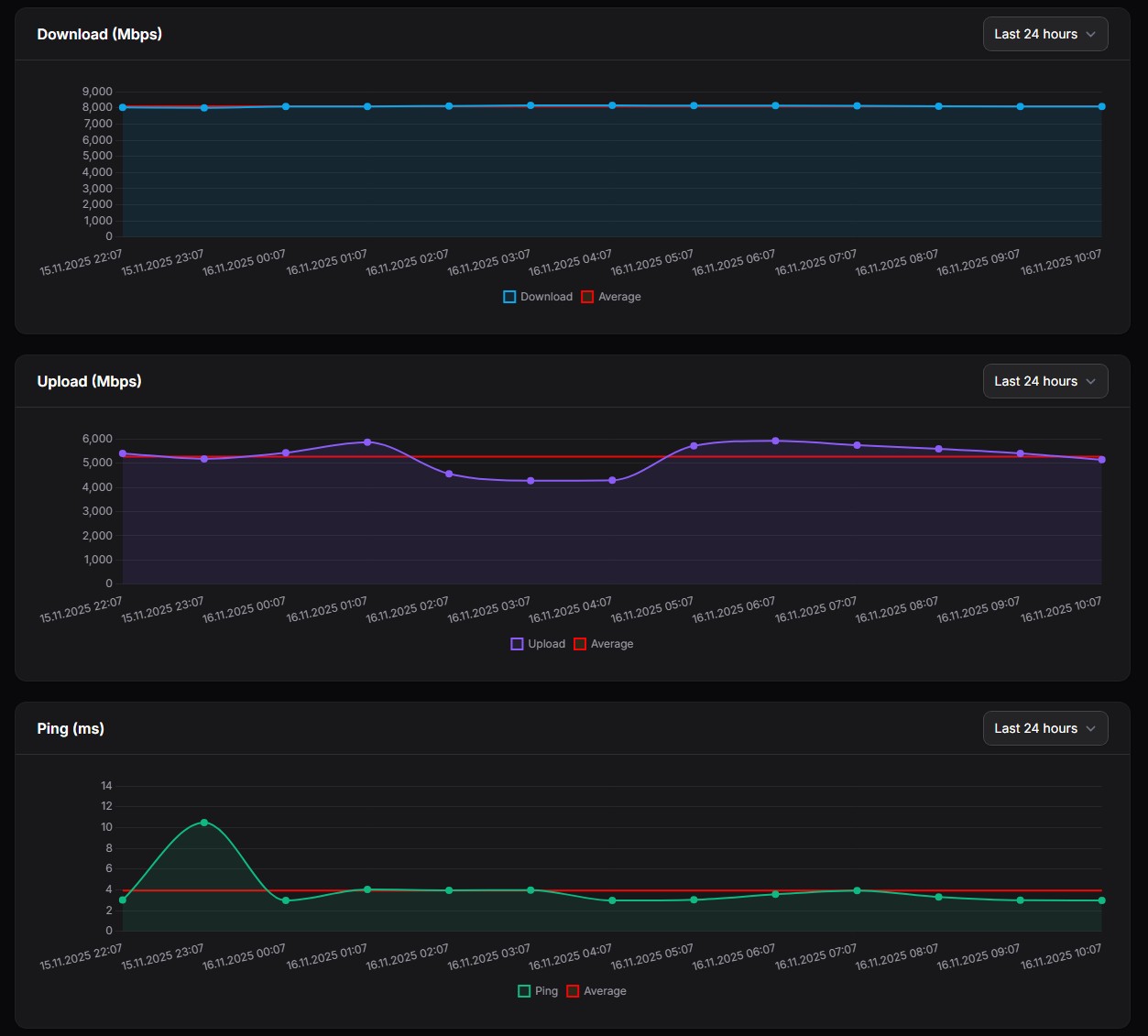
I have a new container (or lets say toy). It’s called Speedtest-Tracker and you can setup automatic speedtests (also with a predetermined testserver). Average so far:
Download (Gbit/s): 8.106
Upload (Gbit/s): 5.282
Ping (ms): 4.02
Should I contact my ISP as I’m not getting >8Gbit/s Upload? I had 8.5/8.5 with Init7 before.
No, that’s what you get when you choose a cheap overbooked provider over the gold standard. They will propably argue that even if it’s almost half the advertised value, 5Gbit/s is still plenty and download is much more important than upload blabla.
1 Like
I mean the QoQa offer for CHF 42.90 was just too good to pass on. Init7 is CHF 65-69 per month and I need to rebuy the router for CHF 280. Is it really worth it?
I think I’m still going to open up a support ticket with Sunrise. Maybe they can change my config or whatever to get me more upload speed.
Wow. This is a reall cool setup. I thought I was crazy about security of own data but this is next level. My setup is much simpler - everyone in family has a OneDrive which synchronizes their “Documents” and Phone photos & files, hence each have on-device and network copies (keep on device option set ‘on’), using both Windows and Mac devices/systems. There is a ‘family’ shared drive on OneDrive and this one is backed up to local machine as well. The OneDrive is then backed synchronized ot Synology, which sits at home. Passwords on 1Password, 2FA where possible through Google or Microsoft app.
using your freshly acquired experience, how would you suggest I solve the following:
- I can sync OneDrive folders that I control but not the ones from my family members (i do not want to know their passwords) to Synology NAS - any software/solution. any other suggestions as to which NAS? i’m fine to tinker a bit, but typically want to stay with ‘consumer grade’ products
- my mesh network is getting old (no security updates anymore), which would you suggest, ideally with the DNS server capability and dual WAN (I have swisscom + cable network). same comment, i’m ok to do settings, open/close ports and packet forwarding but not too keen to re-compile server kernel, etc.
thanks. your story is quite inspirational !!
1 Like
They probably offer the advertised speed (up to the fiber collector, it’s just shared among users and if the peering is saturated you won’t be able to reach the max). Overcommitting is how they’re able to offer such low price.
2 Likes
In curious if you considered tailscale funnel for your brother:
So he could access without a VPN but you wouldn’t need to keep a hole open in your router firewall.
Sitting here reading this thread while my CHF 0.23/month M365 6 TB subscription from Turkey is running… and wondering how many decades it’ll take before a NAS ever pays for itself…
Joke aside, very interesting insights, thank you all! Maybe I will switch to a NAS, one day.
4 Likes
If you want consistent speed as advertised, yes. If you don’t mind fluctuations, there are cheaper options than init7.