I love the nerd level of this. Great achievement dude.
Interesting, I did something similar a few weeks ago for internal access, however I didn’t want to install the certificates on my end devices and instead opted for a Let’s Encrypt certificate through a DNS challenge through Cloudflare, now I can access internally through jelly.home.mydomain.com and externally through jelly.mydomain.com. I have two Nginx instances running, one for the external and one for the internal network.
You gave quite a sophisticated setup now, congrats on your journey. Our setups are quite similar, however I use LXC instead of docker containers. Are you satisfied with the performance of your NAS?
Thanks, invested quite some time into it 
Nah, the LEDs on the bedframe anyway needed power as well. However, I got rid of this automation when our daughter was born as our routines changed and it was no longer useful, have some other thibgs setup now to cover these routines.
1 Like
I mean I didn’t have a daughter yet, no dog to take care, only me, my wife and lots of free time 
At one point I was seriously considering getteing self employed and install home automation systems. I even soldered my own sensors, designing PCBs etc. 
Funny, I’m in the middle of migrating my DNS to Cloudflare right now (did the change about an hour ago, just waiting for propagation). The goal is exactly what you described. Get rid of my internal CA and use a wildcard Let’s Encrypt cert via DNS challenge for everything, both internal and external. I’m leaning toward a single Nginx instance though. With split-horizon DNS (internal wildcard → LAN IP, public wildcard → WAN IP) and access rules in Nginx. I don’t really see a reason to run two separate proxies with proper access lists (avoids duplicating configs too).
Actually I just tried it out. Added a wildcard DNS rewrite in Adguard (*.mydomain.com) and accessed Jellyfin through https://www.jelly.mydomain.com → I’m seeing my LAN IP under Activity. It works flawlessly!
Performance has been great so far. 10G makes transfers insanely fast and the CPU has more than enough headroom. Jellyfin can handle 4-5 simultaneous 4K transcodes without breaking a sweat 
P.s. I made a post on Reddit and the replies were extremely helpful. Maybe you’ll find it interesting: https://www.reddit.com/r/homelab/comments/1pwemw7/i_removed_all_docker_ports_from_my_homelab_and/
1 Like
Glad the single-NGINX approach works for you! I use the two instances because of:
Different Performance Profiles
nginx-ext (internet-facing):
- Aggressive rate limiting (10 req/s)
- fail2ban integration
- Strict security headers
- Optimized for internet latency
nginx-int (LAN-only):
- No rate limiting (gigabit LAN doesn’t need it)
- Proxy buffering disabled (LAN is fast enough)
- Simpler configs
- Optimized for local network speeds
Running two instances lets me tune each for its specific environment without compromises.
Certificate Transparency Privacy
I use different domain patterns:
- External:
*.mydomain.com(appears in public CT logs) - Internal: Separate wildcard for internal-only services
This keeps my internal service names completely private. Certificate Transparency logs show my 7 public services, but not my Proxmox, Grafana, internal dashboards, or other admin tools. Attackers can’t enumerate my internal infrastructure.
Operational Independence
Independent updates:
- Restart nginx-ext for security patches? Internal users unaffected.
- Experiment with nginx-int configs? External access stays rock-solid.
- Test new services in nginx-int? Zero risk to public-facing infrastructure.
Simplified troubleshooting:
- External access broken? Check nginx-ext only.
- Internal access broken? Check nginx-int only.
- No need to debug complex routing logic in a single instance.
Clean Separation of Concerns
My nginx-ext config: 85 lines (7 services, rarely changes, heavily audited)
My nginx-int config: 500+ lines (21 services, frequently updated, experimental features)
Keeping them separate means:
- External config stays minimal and stable
- Internal config can evolve without risk
- Easier to audit what’s actually exposed to the internet
Network Architecture Alignment
I run 12 VLANs with strict firewall segmentation:
- nginx-ext in VLAN 1 (Infrastructure) - limited service access
- nginx-int in VLAN 10 (Personal) - full access to all VLANs
This matches my security model where infrastructure services are isolated and only admin VLANs have full network access.
Bottom Line:
For my 21-service, 12-VLAN homelab with both public and private services, dual NGINX provides:
- Better performance tuning (LAN vs WAN optimizations)
- Privacy (internal services invisible in CT logs)
- Operational safety (independent updates/restarts)
- Network architecture alignment (VLAN isolation)
The cost of one extra LXC container is worth these benefits for my use case.
1 Like
What are the 21 services?
Sounds like something I might end up actually doing myself. Thanks for sharing your insights. I‘m running those:
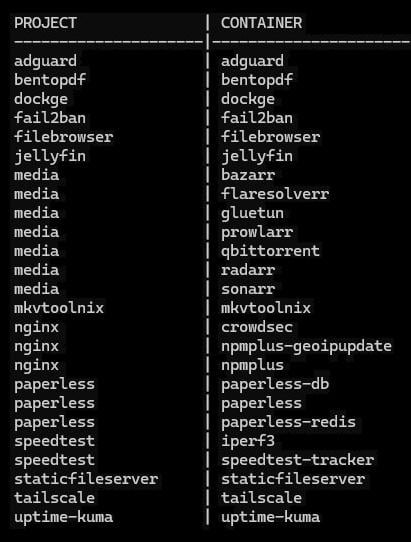
1 Like
My home set-up is similar:
- I have an Nginx as reverse proxy which terminates SSL using my own CA certificate
- Proxy forwards to various VMs, Docker containers or LXCs.
- CA certificate is installed on all client machines
- Services are for internal only
- Security is enforced through using Wireguard as the network layer
For external, I have a separate server in a datacenter:
- Nginx reverse proxy
- SSL is provided by Cloudflare which itself acts as SSL terminator, but this essentially binds me to the Cloudflare service
I previously also ran my own E-mail server for many years until electricity costs at the datacenter made it so expensive (£70+ per month), I switched to a paid Google Workspace account.
I had a look at what I am running on the home computer:
- n3 - custom tool
- fn-prod - custom tool
- litellm LLM proxy
- nginx reverse proxy
- experimental postgres DB
- scanner - custom document management
- open-webui - local LLM interface
- pg - postgres DB
- dyndns - custom tool to communicate dynamic IP to external server so I can always locate my home machine
- pihole - adblocker
- local large language model service
- GPU accelerated jupyter notebook
- seaweedfs - S3 compatible blob storage
- wireguard - provides VPN for mobile and remote access to home network
I forgot:
- Git repos
- Restic backup
4 Likes
Ok, it’s actually more than 21 services now, has grown in the past few weeks. And in addition to the below there’s also Proxmox and my two NAS that are accessible internally through the NGINX reverse proxy.
 Infrastructure (VLAN 1)
Core infrastructure services: networking, DNS, VPN, reverse proxy.
Key Services:
-nginx (ext) - External reverse proxy for internet access (*.mydomain.com)
- nginx (int) - Internal reverse proxy for home network (
*. home.mydomain.com) - pihole - DNS server and network-wide ad blocking
- wireguard - VPN server for secure remote access
- unifi - UniFi Controller for network management
Monitoring:
- influxdb - Time-series database for sensor data
- grafana - Monitoring dashboards and visualization
- prometheus - Metrics collection and monitoring
 Personal (VLAN 10)
Personal productivity and data services.
Key Services:
- vaultwarden - Password manager (Bitwarden compatible)
- nextcloud - File sync, contacts, calendars
- vscode - VS Code Server for remote development
- obsidian - Obsidian
- beancount - Financial tracking and accounting
- portfolio-performance - Investment portfolio tracking
- homepage - Homelab dashboard
 Media (VLAN 80)
Media management and streaming services
Key Services:
- jellyfin - Media server for movies, TV shows, music
- sonarr - TV show management and automation
- radarr - Movie management and automation
- prowlarr - Indexer manager for *arr stack
- sabnzbd - Usenet download client
- calibre-web - Ebook library and reader
- youtube-dl-webui - YouTube downloader
 Smart Home (VLAN 40)
Smart home and monitoring services.
Key Services:
- home-assistant - Smart home automation hub
- mosquitto - MQTT message broker
- ha-db-postgres - PostgreSQL database for Home Assistant
I have a few more on the list as soon as I get more time:
- paperless
- immich
- authelia or authentik
- monica
- emulator.js
3 Likes
@Burningstone @PhilMongoose what do you do professionally?
Because for someone not working in IT I’m actually quite proud of the whole setup. Learned a ton in the last 3-4 months which I never expected when I ordered the NAS. Maybe I should put it on my CV under personal projects.
1 Like
You could clearly list SysDevOps in your hobbies section. The effort you’ve invested is remarkable for someone without a traditional IT background. Alternatively, you could go more generic with « New technologies and automation » if you want broader appeal.”
Congrats on your journey !
6 Likes
I work in finance for an asset management company, no IT background, nothing IT related in my job.
Same here 
3 Likes
Same here. Work in Finance, no formal IT qualitfications. I always wanted a computer as a kid to play games. My father always refused. My uncle, who lived with us bought a 286 for his studies (first person in family to go into higher education - a polytechnic). When he left the country for his job, I ‘inherited’ the PC. Sadly, no games on there, just an IBM DOS manual together with Turbo Pascal compiler and a ‘learn Pascal’ book. Give a machine with infinite depth to a kid with a lot of time on his hands and the rest is history.
I’d say my IT skills far exceed my professional finance skills. I’ve learned to reverse engineer programs, break encryption and protection systems, published software on Android with over a million downloads, contributed to various some github projects as well as written a lot of software for my own use.
Not going into IT as a career was probably the worst mistake of my professional life: I now have to spend free time working on my hobby whereas I could have increased my skills by working in IT as a career while getting paid for that.
6 Likes
Funny that we all work in finance. I don’t have an IT background too but I think any PC hardcore gamer acquired some IT skills over the years (or decades by this point). Building your own gaming PC, solving issues, helping friends and family out.
@Burningstone Btw I’m getting not secure when I access my public services with https://www.service.mydomain.ch instead of https://service.mydomain.ch → it worked just fine before with redirects and single certificates. But it doesn’t work with the wildcard certificate anymore. Did I setup something wrong?
Unless you work in Big Tech, it’s much more lucrative to work in finance than in IT, so you all made the right move .
4 Likes
On the other hand - might have been the best one -
At least you didn’t lose the joy of it.
1 Like
Yeah. A friend at Google asked me several times to join him, and I dismissed the idea thinking it was too late to make a career move. I had no idea they were on 7 figure packages and that might have made me consider more carefully.
*.domain.com does not cover *.something.domain.com
www just happens to be a subdomain among others
1 Like
I just moved everything to https://service.mydomain.com and stopped using www-links entirely. Just had to tell all my friends and family members to change their Jellyfin server address
3 Likes