# Beancount advancement Thread
**URL:** https://forum.mustachianpost.com/t/beancount-advancement-thread/2786
**Category:** Life Hacking
**Created:** [November 20, 2019, 11:35am UTC](https://forum.mustachianpost.com/t/beancount-advancement-thread/2786 "2019-11-20T11:35:13Z")
**Posts on this page:** 20
**Page:** 6
### Author:  [@nugget](https://forum.mustachianpost.com/u/nugget)
#### Post date: [December 21, 2019, 12:49pm UTC](https://forum.mustachianpost.com/t/beancount-advancement-thread/2786/103 "2019-12-21T12:49:59Z")
if someone knows how to install beancount on windows, id’ gladly have some help with it. I managed to have python 3.8 installed so far, and pip 19.3.1.
---
### Author:  [@pandas](https://forum.mustachianpost.com/u/pandas)
#### Post date: [December 21, 2019, 1:09pm UTC](https://forum.mustachianpost.com/t/beancount-advancement-thread/2786/104 "2019-12-21T13:09:24Z")
Why do you hate yourself and others so much? Just install Ubuntu, it’s much easier. Either in VM, or baremetal right over your windows, or a rent a \*nix box for couple bucks a month, etc. You wanted to get a dev job not long ago, right? Starting by throwing Windows out of the window. Most dev work today is done on Unix-likes.
Sharing files between Windows and Linux is trivial, just use samba or dropbox or github or something. I think VirtualBox has built-in support right out of the box for samba shares. Not sure what Hyper-V has, I don’t use it, but most likely solved problem too. Docker solved it and so can you
> [@\_name](#):
>
> Or even installing Beancount on the host machine directly 🙂
His problem is that he’s using Windows on the host
---
### Author:  [@\_name](https://forum.mustachianpost.com/u/_name)
#### Post date: [December 21, 2019, 1:13pm UTC](https://forum.mustachianpost.com/t/beancount-advancement-thread/2786/105 "2019-12-21T13:13:29Z")
Okay, so it seems that Windows install was not as easy as I thought 😅
I use macOS and Ubuntu, I had hoped it would be the same.
---
### Author:  [@nugget](https://forum.mustachianpost.com/u/nugget)
#### Post date: [December 21, 2019, 1:19pm UTC](https://forum.mustachianpost.com/t/beancount-advancement-thread/2786/106 "2019-12-21T13:19:32Z")
> [@pandas](#):
>
> Why do you hate yourself and others so much?
I don’t. no idea how you get to that.
---
### Author:  [@pandas](https://forum.mustachianpost.com/u/pandas)
#### Post date: [December 21, 2019, 1:20pm UTC](https://forum.mustachianpost.com/t/beancount-advancement-thread/2786/107 "2019-12-21T13:20:03Z")
The troubles you’re going through to make it work on Windows. It ain’t worth it. It’s developed by people on linux for linux, windows users are an afterthought.
---
### Author:  [@Tino](https://forum.mustachianpost.com/u/Tino)
#### Post date: [December 21, 2019, 3:52pm UTC](https://forum.mustachianpost.com/t/beancount-advancement-thread/2786/108 "2019-12-21T15:52:29Z")
Nugget, don’t get badly but the problem is that you are trying to learn practically from 0: Beancount, Linux, Docker and Python… with the help of a forum and pasting the errors you get in Windows!!! That’s impossible.
If you have some small question, or error we could help but to learn everything… and resume how works python and Docker for windows in some posts??? Impossible. At least me 😉
Cheers.
---
### Author:  [@nugget](https://forum.mustachianpost.com/u/nugget)
#### Post date: [December 21, 2019, 6:06pm UTC](https://forum.mustachianpost.com/t/beancount-advancement-thread/2786/109 "2019-12-21T18:06:21Z")
@Tino I think you nailed it. omg it’s so much^^ but hey, can - do attitude 😃
too much time for this.
---
### Author:  [@Bojack](https://forum.mustachianpost.com/u/Bojack)
#### Post date: [December 21, 2019, 10:00pm UTC](https://forum.mustachianpost.com/t/beancount-advancement-thread/2786/110 "2019-12-21T22:00:20Z")
And what do you think about this:
[https://alexjj.com/blog/2016/managing-my-personal-finances-with-beancount/#free%20fava%20hosting\_1](https://alexjj.com/blog/2016/managing-my-personal-finances-with-beancount/#free%20fava%20hosting_1)
I will try it out for sure, when I have a bit time.
---
### Author:  [@pandas](https://forum.mustachianpost.com/u/pandas)
#### Post date: [December 22, 2019, 12:30pm UTC](https://forum.mustachianpost.com/t/beancount-advancement-thread/2786/111 "2019-12-22T12:30:39Z")
Pretty much instead of docker they use a third-party rented unix box. Probably using docker under the hood or equivalent. I’d stick with docker.
If you have to use a cloud provider for remote access, I’d at least use AWS or next big brand, not a noname hoster.
---
### Author:  [@Bojack](https://forum.mustachianpost.com/u/Bojack)
#### Post date: [December 27, 2019, 2:13pm UTC](https://forum.mustachianpost.com/t/beancount-advancement-thread/2786/112 "2019-12-27T14:13:14Z")
So I managed to organize last 10 years worth of transactions. Phew, was a lot of effort. But it’s worth it to see cool graphics like these:
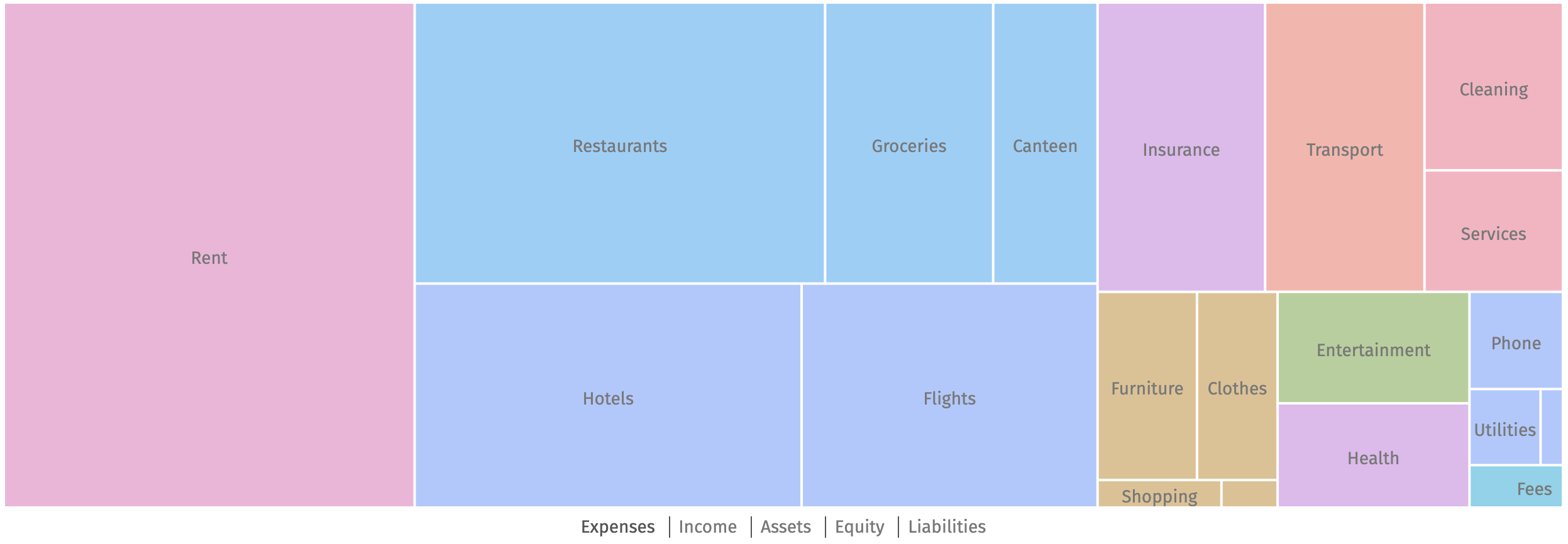
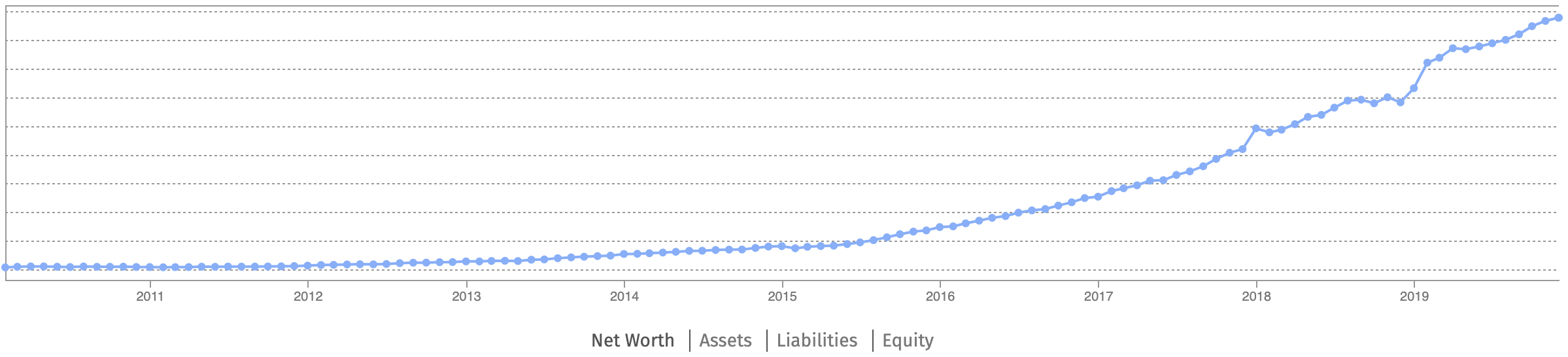
Anybody cares to share?
---
### Author:  [@Tino](https://forum.mustachianpost.com/u/Tino)
#### Post date: [December 27, 2019, 4:09pm UTC](https://forum.mustachianpost.com/t/beancount-advancement-thread/2786/113 "2019-12-27T16:09:53Z")
Wow guy… 10 Years!!! I managed only 3, from 2017 till now!
The older are in paper and I was too lazy 😉
Nice work!
---
### Author:  [@Bojack](https://forum.mustachianpost.com/u/Bojack)
#### Post date: [December 27, 2019, 4:14pm UTC](https://forum.mustachianpost.com/t/beancount-advancement-thread/2786/114 "2019-12-27T16:14:02Z")
Thanks! These are over 5300 transactions. The biggest pain was filling in the blanks. For some months I had no credit card transactions, only the totals, so I had to make rough monthly estimates not to have any holes.
---
### Author:  [@nugget](https://forum.mustachianpost.com/u/nugget)
#### Post date: [December 27, 2019, 4:33pm UTC](https://forum.mustachianpost.com/t/beancount-advancement-thread/2786/115 "2019-12-27T16:33:00Z")
really nice 🙂
i think i also have records starting 2011, but only in _very_ crappy unformatted excel-sheets. i wont transfer those 😃
---
### Author:  [@Tino](https://forum.mustachianpost.com/u/Tino)
#### Post date: [December 27, 2019, 9:56pm UTC](https://forum.mustachianpost.com/t/beancount-advancement-thread/2786/116 "2019-12-27T21:56:03Z")
I found several graphics really useful but the most important is that I managed to reduce my expenses!
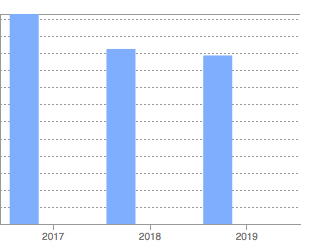
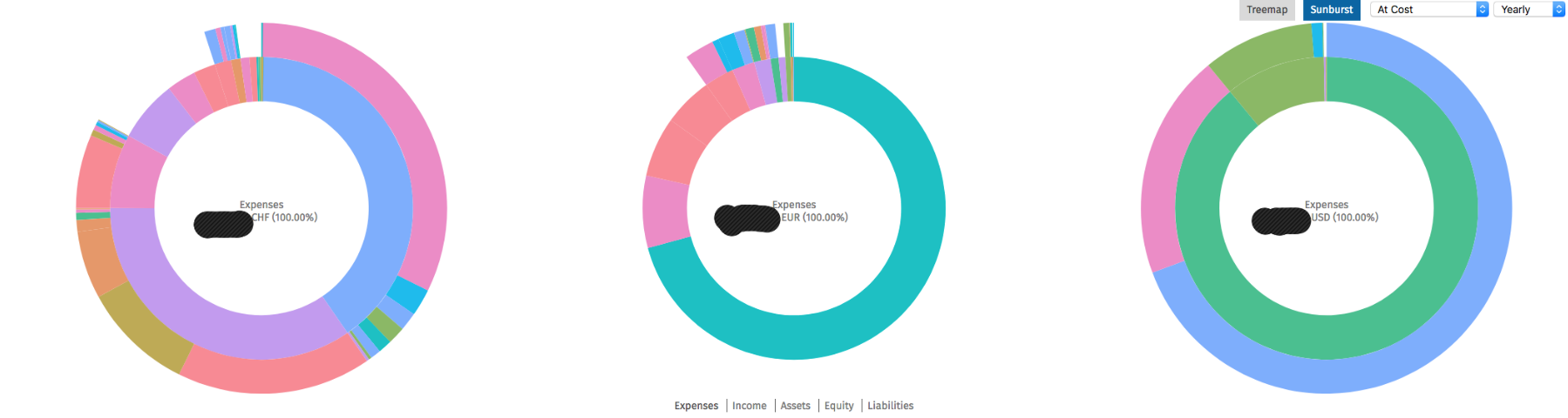
I’ve been using the next to find where the money is going… and I got several surprises or fees that I didn’t realise!
---
### Author:  [@preparations](https://forum.mustachianpost.com/u/preparations)
#### Post date: [January 21, 2020, 4:44pm UTC](https://forum.mustachianpost.com/t/beancount-advancement-thread/2786/117 "2020-01-21T16:44:14Z")
I’m currently trying to get started with my beancount.
However, I’m struggling to come up with the right concept.
How are you guys structuring your entries?
And how would go about tracking private stock? I’m unsure about how to track the value of it as it only gets determined once a year.
---
### Author:  [@tarioch](https://forum.mustachianpost.com/u/tarioch)
#### Post date: [January 21, 2020, 5:27pm UTC](https://forum.mustachianpost.com/t/beancount-advancement-thread/2786/118 "2020-01-21T17:27:17Z")
Are you talking about account structure?
This is what I did:
Asset Accounts,
First level is liquidity (Liquid, Investment, TangibleAssets, ProMemoria). That gives me a good overview of my capital.
Next is the financial institution
Last is account or ccy/instrument.
Income/Expense accounts, group by what you are interested in.
As for your question about private stock. Why would it be a problem if you only add a new price per year?
---
### Author:  [@nugget](https://forum.mustachianpost.com/u/nugget)
#### Post date: [January 21, 2020, 5:49pm UTC](https://forum.mustachianpost.com/t/beancount-advancement-thread/2786/119 "2020-01-21T17:49:20Z")
you have lots of freedom how to design you **account tree**.
i give you some accounts i made and that work well for me (sorry for the Denglisch):
; Giros & Credit cards
; PostFinance
1970-01-01 open Assets:Liq:PF:Giro:CHF CHF
1970-01-01 open Assets:Liq:PF:Giro:Liquidity-cushion CHF
1970-01-01 open Assets:Liq:PF:Kreditkarte CHF
1970-01-01 open Assets:Liq:PF:EUR EUR
1970-01-01 open Assets:Liq:PF:USD USD
1970-01-01 open Expenses:Liq:PF:Fees CHF
1970-01-01 open Income:Liq:PF:InterestBonus CHF
; Recievables & Liabilities
1970-01-01 open Assets:Forderungen:Sonst CHF
1970-01-01 open Assets:Forderungen:Employer CHF
1970-01-01 open Assets:Forderungen:Parents:CHF CHF
1970-01-01 open Assets:Forderungen:Parents:EUR EUR
1970-01-01 open Assets:Guthaben:Digitec CHF
; Illiquid money
1970-01-01 open Assets:Iliq:Mietkaution:CHF CHF
1970-01-01 open Income:Iliq:Mietkaution:Interest CHF
; Investing
; IB
1970-01-01 open Assets:Invest:IB:CHF CHF
1970-01-01 open Assets:Invest:IB:USD USD
1970-01-01 open Assets:Invest:IB:EUR EUR
1970-01-01 open Assets:Invest:IB:VTI:VTI VTI
1970-01-01 open Assets:Invest:IB:VXUS:VXUS VXUS
1970-01-01 open Income:Invest:IB:VTI:Div USD
1970-01-01 open Income:Invest:IB:VXF:Div USD
1970-01-01 open Income:Invest:IB:VTI:PnL USD
1970-01-01 open Income:Invest:IB:VXF:PnL USD
1970-01-01 open Expenses:Invest:IB:Fees:USD USD
1970-01-01 open Expenses:Invest:IB:Fees:CHF CHF
1970-01-01 open Expenses:Invest:IB:WTax:USD USD
;Expenses
1970-01-01 open Expenses:Hobbies:Musik:Instrumente CHF
1970-01-01 open Expenses:Hobbies:Sport:Wandern CHF
1970-01-01 open Expenses:Kleidung:CHF CHF
1970-01-01 open Expenses:Food:Restaurant CHF
1970-01-01 open Expenses:Food:Supermarkt CHF
1970-01-01 open Expenses:Food:Takeaway CHF
1970-01-01 open Expenses:Lohnkosten:AHV CHF
1970-01-01 open Expenses:Lohnkosten:ALV CHF
1970-01-01 open Expenses:Lohnkosten:NBU CHF
1970-01-01 open Expenses:Lohnkosten:S2-Risiko CHF
1970-01-01 open Expenses:Steuern:Quellensteuer CHF
1970-01-01 open Expenses:Medizinisch:Arztbesuche CHF
1970-01-01 open Expenses:Medizinisch:Krankenversicherung CHF
1970-01-01 open Expenses:Medizinisch:Medikamente CHF
1970-01-01 open Expenses:Mobilitaet:OeV:CHF CHF
1970-01-01 open Expenses:Mobilitaet:OeV:EUR EUR
1970-01-01 open Expenses:Telekommunikation:Telefon CHF
1970-01-01 open Expenses:Unbekannt:CHF CHF
1970-01-01 open Expenses:Unbekannt:EUR EUR
1970-01-01 open Expenses:Urlaub CHF
1970-01-01 open Expenses:Versicherungen CHF
1970-01-01 open Expenses:Wohnen:WohnenHaushalt CHF
1970-01-01 open Expenses:Wohnen:Miete CHF
1970-01-01 open Expenses:Wohnen:Internet CHF
; Opening balances
1970-01-01 open Equity:Opening-Balance:USD USD
1970-01-01 open Equity:Opening-Balance:CHF CHF
1970-01-01 open Equity:Opening-Balance:EUR EUR
**@tracking stocks:**
check out bean-price, i.e. try “bean-price -e USD:yahoo/VTI” in your command line.
with a bash script you fetch historic prices
```
echo "my stock price fetching script"
datestart="2015-11-02"
dateend="2019-11-18"
date1="$datestart"
while [["$date1" < "$dateend"]]; do
date1="$(date -u --date="$date1 +1 week" '+%Y-%m-%d')"
echo "$date1"
bean-price commodities.bean --date "$date1" -i >> price.bean
sleep 2
done
```
where commodities.bean contains entries like
```
1970-01-01 commodity VTI
name: "VTI"
asset-class: "stock"
price: "USD:yahoo/VTI"
```
this script fetches weekly prices, but you should be able to modify it accordign to your needs. hope this helps 🙂
---
### Author:  [@Tino](https://forum.mustachianpost.com/u/Tino)
#### Post date: [January 21, 2020, 10:30pm UTC](https://forum.mustachianpost.com/t/beancount-advancement-thread/2786/120 "2020-01-21T22:30:20Z")
Hi,
I recommend you having a look to:
> **[Beancount - Cookbook](https://docs.google.com/document/d/1Tss0IEzEyAPuKSGeNsfNgb0BfiW2ZHyP5nCFBW1uWlk/edit)**
>
> This Doc is private
I started there and will help you to see how structure the data and lots of examples about how to track finances.
Another think I recommends you is that you run:
> $ bean-example \>\> example.bean
That will generate a file: “example.bean” with lots of transactions and examples to get ideas.
Just don’t use the google finance driver in the file, doesn’t work any more but all the rest works perfectly.
---
### Author:  [@nugget](https://forum.mustachianpost.com/u/nugget)
#### Post date: [February 3, 2020, 7:12am UTC](https://forum.mustachianpost.com/t/beancount-advancement-thread/2786/121 "2020-02-03T07:12:06Z")
here some input for those who want to have their beancount files in the cloud (github) - encrypted, of course:
try git-crypt [https://github.com/AGWA/git-crypt](https://github.com/AGWA/git-crypt) ! it works flawlessly with git, only file names are not encrypted. for me it works beautifully to sync my accounting work between devices.
1. install git-crypt:
`sudo apt install git-crypt`
2. make a new repo or take your existing one, and cd to it
3. specify in the `.gitattributes` file in the root folder of the repo (create this file in case it is not there yet) the files and folders to be encrypted
`myLedgerFolder/** filter=git-crypt diff=git-crypt`
`somefile filter=git-crypt diff=git-crypt`
(I put my whole ledger one folder up so i never have to specify individual files but only one folder)
4. type `git-crypt init pathToKeyfile` in your repo root folder. a file with the symmetric key is generated.
5. from now, use the usual `git add commit push` workflow. once pushed to github, try to view the files on the github webpage
6. after cloning the repo to another device, type `git-crypt unlock pathToKeyfile` where this time the key file is read (you have to bring it to your device yourself)
thats it! works like charm!
one little caveat: file names are not encrypted, so my “Doctor\_bill\_for\_XYZ.pdf” can be seen on the website.
---
### Author:  [@Tino](https://forum.mustachianpost.com/u/Tino)
#### Post date: [February 3, 2020, 1:09pm UTC](https://forum.mustachianpost.com/t/beancount-advancement-thread/2786/122 "2020-02-03T13:09:17Z")
Thank you. That’s very useful.
I was using for a while Gitlab that allows you to have a private repo but it’s true that since is not encrypted any admin in Gitlab or a hacker could access the files…
Lately, I’m using a shared directory in my NAS at home that has sync programs in all the operating systems. I have 2FA in the NAS and the disk at home is encrypted.
[Previous page](https://forum.mustachianpost.com/t/beancount-advancement-thread/2786.md?page=5)
[Next page](https://forum.mustachianpost.com/t/beancount-advancement-thread/2786.md?page=7)