# Beancount advancement Thread
**URL:** https://forum.mustachianpost.com/t/beancount-advancement-thread/2786
**Category:** Life Hacking
**Created:** [November 20, 2019, 11:35am UTC](https://forum.mustachianpost.com/t/beancount-advancement-thread/2786 "2019-11-20T11:35:13Z")
**Posts on this page:** 20
**Page:** 5
### Author:  [@tarioch](https://forum.mustachianpost.com/u/tarioch)
#### Post date: [December 8, 2019, 5:55pm UTC](https://forum.mustachianpost.com/t/beancount-advancement-thread/2786/83 "2019-12-08T17:55:49Z")
Yes, you can transfer them but need to keep cost assigned. If you have multiple positions with different costs you have to list all of them with their cost.
There’s ways to merge them together into one position with an average cost but you would have to do it manually as well.
---
### Author:  [@nugget](https://forum.mustachianpost.com/u/nugget)
#### Post date: [December 15, 2019, 9:33pm UTC](https://forum.mustachianpost.com/t/beancount-advancement-thread/2786/84 "2019-12-15T21:33:59Z")
here is a searchable wrapper for the beancount documentation:
[https://aumayr.github.io/beancount-docs-static/users/cl\_accounting.html](https://aumayr.github.io/beancount-docs-static/users/cl_accounting.html)
here examples for the query command:
[https://aumayr.github.io/beancount-sql-queries/](https://aumayr.github.io/beancount-sql-queries/)
…which i just used for my first data series export from my bookkeeping data: my monthly supermarket expenses!
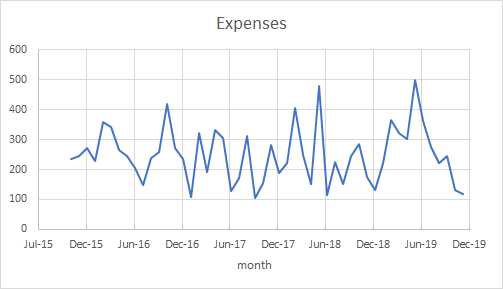
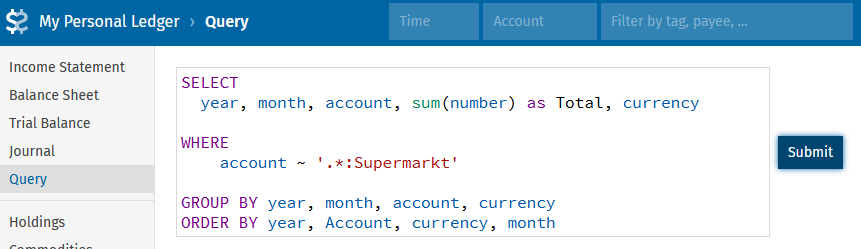
by the following syntax
```
SELECT
year, month, account, sum(number) as Total, currency
WHERE
account ~ '.*:Supermarkt'
GROUP BY year, month, account, currency
ORDER BY year, Account, currency, month
```
into the fava Query line
awesome 😍 🥰
---
### Author:  [@nugget](https://forum.mustachianpost.com/u/nugget)
#### Post date: [December 15, 2019, 11:31pm UTC](https://forum.mustachianpost.com/t/beancount-advancement-thread/2786/85 "2019-12-15T23:31:45Z")
I think overall all of my beancount workflow is as terrible as it can be. I’d be very happy to see some live demonstration of it from someone who is confident with his setup.
Whom may I invite for coffee? 😃
---
### Author:  [@nugget](https://forum.mustachianpost.com/u/nugget)
#### Post date: [December 18, 2019, 2:00pm UTC](https://forum.mustachianpost.com/t/beancount-advancement-thread/2786/86 "2019-12-18T14:00:10Z")
so right now i am stuck with docker mapping ports between the container and host:
`docker run --rm -it -p 5000:5000 -v hostPath:containerpath mybeanimage:v1`
allowes me to start Fava, and i works:

however my host system wont show any of it. as far as i read on google this is a known issue when mapping ports of a unix containrt to a windows host.
anyone here has experience or solved this?
It’s quite killing the feature of Fava 😃
---
### Author:  [@Tino](https://forum.mustachianpost.com/u/Tino)
#### Post date: [December 18, 2019, 8:25pm UTC](https://forum.mustachianpost.com/t/beancount-advancement-thread/2786/87 "2019-12-18T20:25:18Z")
Hi,
My command:
docker run --detach --name=“beancount” -e BEANCOUNT\_FILE=/bean/my\_ledger.bean -v $PWD:/bean --publish 5000:5000 yegle/fava
At first was the the same as you… was not working because the paths. The files (2019.bean, my\_ledger.bean, etc.) are in the place where I launch the command.
In Docker you must put a path but not the root… In my command you “link” the place where you are ($PWD) with a virtual directory (/bean) inside the running container.
That is just for the first time the container is created. Later with: docker run beancount is enough.
Regards.
---
### Author:  [@nugget](https://forum.mustachianpost.com/u/nugget)
#### Post date: [December 20, 2019, 1:51pm UTC](https://forum.mustachianpost.com/t/beancount-advancement-thread/2786/88 "2019-12-20T13:51:24Z")
Hey Tino,
I saw this specification of BEANCOUNT\_FILE, but i do not understand what it’s good for. why do you have this in the command, and what does it change?
apart from that, i cant get fava to be displayed on my host browser. i used
`docker run --detach --name="beancount" -e Beancount_file=/data/Bo.bean -v hostPath:/containerPath --publish 5000:5000 mybeanimage:v1`
see [https://forums.docker.com/t/docker-container-on-windows-host-system-how-to-access-mapped-ports/86034](https://forums.docker.com/t/docker-container-on-windows-host-system-how-to-access-mapped-ports/86034)
---
### Author:  [@Tino](https://forum.mustachianpost.com/u/Tino)
#### Post date: [December 20, 2019, 2:09pm UTC](https://forum.mustachianpost.com/t/beancount-advancement-thread/2786/89 "2019-12-20T14:09:34Z")
Haha Nugget, I saw you put the same question in the beancount group…
Look, I see you are a “Real” windows user 😂
If I write: BEANCOUNT\_FILE=/bean/my\_ledger.bean -v $PWD:/bean you must write **the same** in your command! Don’t invent your own parameters!!! HAHAHA… “Beancount\_file” is not he same as “BEANCOUNT\_FILE” and the rest the same!
$PWD means your current path… so if you are in “C:\Nugget\_bean\_files” either you put $PWD or you put the path complete…
Docker is really powfull but need to be understood… just copy my command **exactly** and try 😉
---
### Author:  [@tarioch](https://forum.mustachianpost.com/u/tarioch)
#### Post date: [December 20, 2019, 2:13pm UTC](https://forum.mustachianpost.com/t/beancount-advancement-thread/2786/90 "2019-12-20T14:13:12Z")
Hi,
BEANCOUNT\_FILE defines an environment variable which defines which file that fava should use, it’s an alternative to adding it as an argument like I had in my example.
I’ve had issues with docker on windows (using the old/legacy docker toolbox, which also runs on windows 10 home). There I had to use the ip of the virtualbox instance, e.g. 192.168.99.100 in my case)
---
### Author:  [@nugget](https://forum.mustachianpost.com/u/nugget)
#### Post date: [December 20, 2019, 2:18pm UTC](https://forum.mustachianpost.com/t/beancount-advancement-thread/2786/91 "2019-12-20T14:18:22Z")
different question, i have problems with bean-price.
i have two entries in my commodity.bean:
```
1970-01-01 commodity VTI
name: "VWO"
asset-class: "stock"
price: "USD:yahoo/VTI"
```
and
```
1970-01-01 commodity VWRL
name: "VWRL"
asset-class: "stock"
price: 76.28 CHF ; no holdings since selling this yers ago
```
when the commodities.bean contains only the latter, i get a lengthy python error (see below) that i believed i solved on my WSL by hacking into the bean-price code and fixing some date formats. of coures i _exactly_ dont want to do this with the docker containers.
when the comodities.bean contain only the former, there is zero output. running
`bean-price -e USD:yahoo/VTI`
results in the desired output. can anyone help me with this?
python error code:
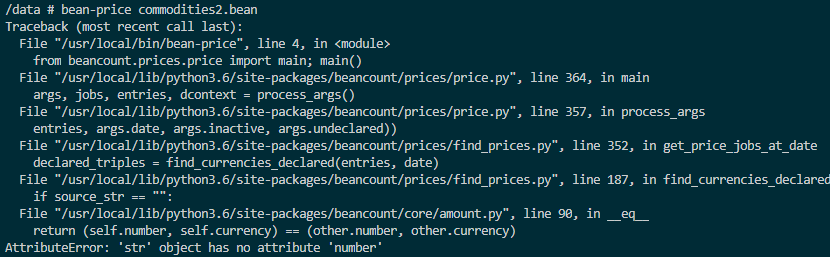
… in my real commodity file there are some more commodities, among them VWRL, and i think they should not throw errors
---
### Author:  [@nugget](https://forum.mustachianpost.com/u/nugget)
#### Post date: [December 20, 2019, 2:21pm UTC](https://forum.mustachianpost.com/t/beancount-advancement-thread/2786/92 "2019-12-20T14:21:37Z")
how do you find that ip?
i believe i tried all IPs my `-ipconfig -all` displayed and the corresponding command for the docker container, with no result. once i could see the fava interface from another laptop in the same network, but never on the host. seriously. but at least i know the fava part _does_ work.
---
### Author:  [@nugget](https://forum.mustachianpost.com/u/nugget)
#### Post date: [December 20, 2019, 2:22pm UTC](https://forum.mustachianpost.com/t/beancount-advancement-thread/2786/93 "2019-12-20T14:22:48Z")
hey tino plz dont laugh at me, i actually **really** try hard. if it was straight forward, i would not ask. stuff is not obvious to me.
by now @tarioch pointed out to me what that variable does, thanks. i do not us it, i am aware of the fava `file.bean` syntax. It does not help with me getting no Fava interface.
I’d still be realy really be grateful if you could find the 30 min and suport my learning of this with a remote desktop session… 😃
---
### Author:  [@Tino](https://forum.mustachianpost.com/u/Tino)
#### Post date: [December 20, 2019, 2:46pm UTC](https://forum.mustachianpost.com/t/beancount-advancement-thread/2786/94 "2019-12-20T14:46:09Z")
I’m sorry… I didn’t try to make you stupid or something like that… Just joking, OK?
The guy that did the docker that we are using is: [https://github.com/yegle/fava-docker](https://github.com/yegle/fava-docker)
In this page you can see that he says:
```
BEANCOUNT_FILE` : path to your beancount file. Default to empty string.
```
You can use that or use like tarioch said, is the same.
The “global command” is shown also in the git page:
```
# assume you have example.bean in the current directory
docker run -v $PWD:/bean yegle/fava /bean/example.bean
```
THis command means: Run the container/program “yegle/fava” and do my current path in my machine a virtual path in the docker machine known as /bean. Run the yegle/fava **inside** the container with my bean file.
Since you linked your external path where your file lives with a internal path know /bean, you must run /bean/your\_file.bean
So, don’t worry about the /bean! You can call this directory… whatever…
The next command do the same also:
```
docker run --detach -e BEANCOUNT_FILE=/I_like_more_this_internal_path/my_ledger.bean -v $PWD:/I_like_more_this_internal_path --publish 5000:5000 yegle/fava
```
---
### Author:  [@nugget](https://forum.mustachianpost.com/u/nugget)
#### Post date: [December 20, 2019, 3:00pm UTC](https://forum.mustachianpost.com/t/beancount-advancement-thread/2786/95 "2019-12-20T15:00:25Z")
hey thanks 🙂
i think i got the point 🙂 the yegle/fava includes the execution of fava into the container, no?
i indeed used the other docker image from further up. but finally, it does not work for me.
what do I do?
1. opening my win shell, typing `docker pull yegle/fava`
works nicely.
2. in my win shell, i enter `docker run -v [hostPath]:/bean yegle/fava /bean/main.bean`
I know from my vscode docker plugin, that the container is running, didnt see any errors.
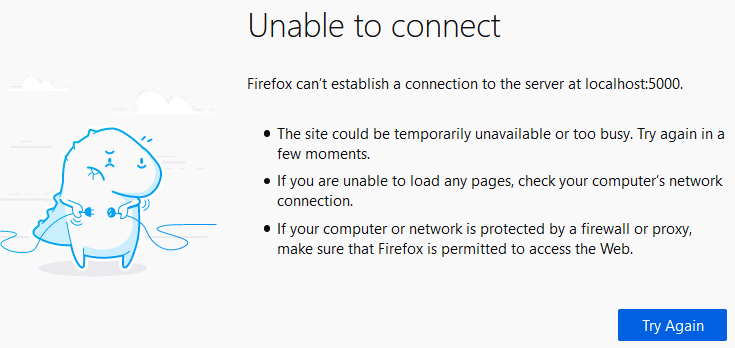
3. i g to my browser and enter `http://localhost:5000/`
result:
4. I am back to zero, quite abit lost because i don’t know where to look next.
5. one idea: check all those IPs again.
6. in my windows shell: `-ipconfig -all` returns, among others,
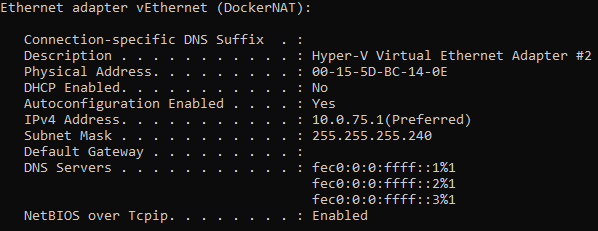
7. so i try in my browser [http://10.0.75.1:5000/](http://10.0.75.1:5000/) same result. i try a few more IPs from that list, too. I try all IPs via another browser (vanilla, no adblock /http_s_ enforcer plugins), no result
8. im back to zero. what next? any idea?
---
### Author:  [@nugget](https://forum.mustachianpost.com/u/nugget)
#### Post date: [December 20, 2019, 3:07pm UTC](https://forum.mustachianpost.com/t/beancount-advancement-thread/2786/96 "2019-12-20T15:07:57Z")
… and finally i have it on my screen. wow. thanks guys for the help.
i still have no idea what mae it work 😒
---
### Author:  [@nugget](https://forum.mustachianpost.com/u/nugget)
#### Post date: [December 20, 2019, 3:42pm UTC](https://forum.mustachianpost.com/t/beancount-advancement-thread/2786/97 "2019-12-20T15:42:07Z")
ok, now that you guys enabled me to run fava, i’d like to go one step back, shell into the container and play abit with bean-functions.
i used the “attach shell” option in vscode, which is a windows-user-way to enter
`docker exec -it 0cef1b3d5d8d7db572ea8073361655a0e5d99b6dade1d967ebc5ba9d9158e1c0 /bin/sh -c "[-e /bin/bash] && /bin/bash || /bin/sh"`
and there I go, but i have no idea how to do stuff here:

the beancount commands however work, but i don’t know how to locate a file as argument:

what do i need to do to use this shell like i am used to unix: ls, touch, chmod, change directory,… ?
my goal here is to to `bean-check myledger.bean`
i think there is some difference in that yegle container, but what?
---
### Author:  [@pandas](https://forum.mustachianpost.com/u/pandas)
#### Post date: [December 20, 2019, 8:59pm UTC](https://forum.mustachianpost.com/t/beancount-advancement-thread/2786/98 "2019-12-20T20:59:19Z")
Sheesh, just install a normal VM already, Ubuntu or something.
---
### Author:  [@\_name](https://forum.mustachianpost.com/u/_name)
#### Post date: [December 21, 2019, 4:36am UTC](https://forum.mustachianpost.com/t/beancount-advancement-thread/2786/99 "2019-12-21T04:36:34Z")
Or even installing Beancount on the host machine directly 🙂
If convenience is the most important factor, I have been convinced that the `pip install` way is easier than learning Docker by now!
---
### Author:  [@nugget](https://forum.mustachianpost.com/u/nugget)
#### Post date: [December 21, 2019, 7:59am UTC](https://forum.mustachianpost.com/t/beancount-advancement-thread/2786/100 "2019-12-21T07:59:10Z")
plz have me an installation tutorial to run beancount on windows10^^
i want to have the same environmen across at least two different machines. hence the idea to encapsulate is the same docker container.
I did use WSL / Ubuntu 18 in the beginning, but hat lots of trouble with that too. no way to sync it across two machines to my knowledge. so, i though maybe docker could be nice.
on top of that docker is awesome and i am happy to have learned something about it during my beancount project
---
### Author:  [@\_name](https://forum.mustachianpost.com/u/_name)
#### Post date: [December 21, 2019, 10:27am UTC](https://forum.mustachianpost.com/t/beancount-advancement-thread/2786/101 "2019-12-21T10:27:39Z")
You’re right that it’s a great opportunity to learn about Docker hands-on!
About syncing, since Python is completely cross-platform, wouldn’t it be possible to only sync the Beancount files via e.g. Dropbox and it will run smoothly on both Windows and Ubuntu?
I don’t have a Windows machine here, but I don’t expect it to be more complicated that:
1. Install Python 3 64bits from the official website
2. pip install Beancount and fava
And same on the Ubuntu machine.
---
### Author:  [@nugget](https://forum.mustachianpost.com/u/nugget)
#### Post date: [December 21, 2019, 11:48am UTC](https://forum.mustachianpost.com/t/beancount-advancement-thread/2786/102 "2019-12-21T11:48:57Z")
> [@\_name](#):
>
> About syncing, since Python is completely cross-platform, wouldn’t it be possible to only sync the Beancount files via e.g. Dropbox and it will run smoothly on both Windows and Ubuntu?
haha thats what im doing 😃 syncing the beancount files is straight forward to me, but not “syncing” the OS
one of the issues i had with the WSL Ubuntu was that i did not manage to make it see files in my dropbox. that’s currently my main reason to look for alternatives
[edit]
shit, you know what? i was convinced i needed a unix OS, and just now found out (after your comment) that python / bencount can be installed on the windows cmd 🙄 🥳
next challange: getting visual c++ for beancount:

[edit]
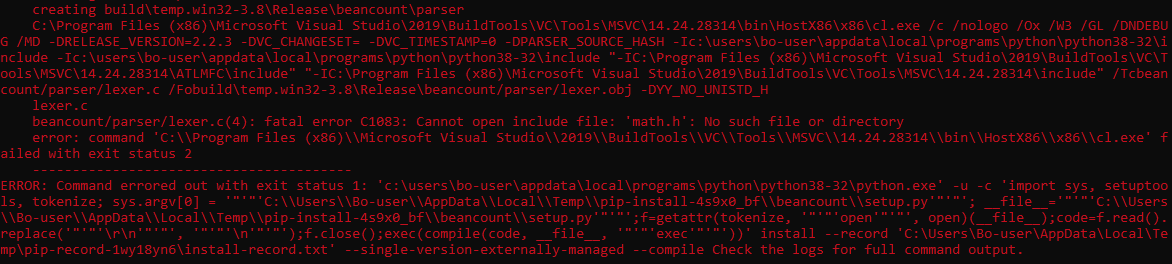
installed VS C++ and Build tools, new error coming forth during beancount installation…
[Previous page](https://forum.mustachianpost.com/t/beancount-advancement-thread/2786.md?page=4)
[Next page](https://forum.mustachianpost.com/t/beancount-advancement-thread/2786.md?page=6)