### Author:  [@nugget](https://forum.mustachianpost.com/u/nugget)
#### Post date: [November 20, 2019, 11:35am UTC](https://forum.mustachianpost.com/t/beancount-advancement-thread/2786/1 "2019-11-20T11:35:13Z")
Heyall,
I got encuraged to post my beancount questions here. here they are!
# 1. fetching prices
## 1.1 technical implementation
I already learnt about the PnL in beancount. I now want to know my today’s net worth based on ETFs i boought earlier. a minimal example is
> ;; -_- mode: org; mode: beancount; coding: utf-8; fill-column: 400; -_-
> option “operating\_currency” “USD”
> plugin “beancount.plugins.unrealized” “PnL”
>
> ; initiate VTI (=Fund) commodity
> 1970-01-01 commodity VTI
> name: “VTI”
> price: “USD:yahoo/VTI”
>
> ; open USD, VTI & PnL Accounts
> 1970-01-01 open Assets:VTI VTI
> 1970-01-01 open Assets:VTI:PnL USD
> 1970-01-01 open Assets:Cash USD
>
> ; open the money press
> 1970-01-01 open Equity:Opening-Balance:USD USD
>
> ; give me some toy-money
> 2018-12-31 pad Assets:Cash Equity:Opening-Balance:USD
> 2019-01-01 balance Assets:Cash 10000.00 USD
>
> ;Some VTI we bough a while ago
> 2019-07-11 \* “Buying some VTI for test purpose”
> Assets:VTI 10 VTI { 152.83 USD}
> Assets:Cash
>
> ; now, what’s my current net worth? I.E. what’s my PnL?
I do know that there is bean-price, and i can get it working:
> $ bean-price test.beancount -v
> INFO : Using price cache at “/tmp/bean-price.cache” (with indefinite expiration)
> INFO : Processing at date: 2019-11-19
> INFO : Loading “test.beancount”
> \:0: A valid price for VTI/USD could not be found
> 2019-11-19 price VTI 158.69 USD
how do I get the current price of VTI into my balance statement without hardcoding the numbers?
[auto-answer] ok i found out now you can do
> bean-price test.beancount \>\> test.beancount
which redirects the output of bean-price (which is already in the correct beancoount syntax) to the end of your ledger file. next question: fetching weekly prices fromthe last 3 years^^
[edit] someone told me that i have to manually insert the stdout from bean-price to my ledger file. is this true? how would I outomate this? must be something like append…
[edit2] I found out now that, in order to get quotes based on an lodger file via
> bean-price stash.beancount
one needs to have bought some. using pad and balance alone is not sufficient to make bean-price look up the quotes. now it’s like
> $ bean-price stach.beancount
> INFO : Fetching: VBR (time: None)
> INFO : Fetching: VSS (time: None)
> INFO : Fetching: VTI (time: None)
> INFO : Fetching: VWO (time: None)
> INFO : Fetching: VXF (time: None)
> 2019-11-20 price VBR 133.40 USD
> 2019-11-20 price VSS 107.51 USD
> 2019-11-20 price VTI 158.60 USD
> 2019-11-20 price VWO 42.43 USD
> 2019-11-20 price VXF 122.61 USD
> 2019-11-20 price VXUS 54.04 USD
awesome!
## 1.2 getting VIAC’s CSIF tickers
looks like the CSIF funds are not listed on yahoo, or at least i could not finde them. with google down and yahoo not listing, does anyone have some ways to fetch those prices? I am referring to
CSIF SMI
CSIF SPE extra
CSIF all World ex CH
CSIF all World ex CH Small
CSIF Emerging markets
CSIF Real estate CH
# 2. workflow
maybe this is a bit early to ask^^ up to now (that is 4 weeks or so) i do most edits manually in a text editor. so far, this is not at all superior to my GUI-workflow with th Gnucash GUI. Anyone in here can describe their typical workflow maybe make a screen video or such, to let me see how to efficiently work with beancount?
# 3. File (re-) organisation
converting my 2 years of GnuCash to Beanconut got me some 6000 lines of code. mostly the openings on top and all transactions chronologically afterwards. From the documentation i saw Martin proposes grouping by type rather than date. How do you handle this? what works best for you?
# 4. Importing postfinance, DKB and IB
maybe I also should ask this a little later since i have not really tried myself. I saw the available DKB importer and reading through it made me confident to be able to translate it to postfinance.however if anyone already did this… Then, again, I am not yet aware of the workflow. would I call the importer on a downloaded csv-statement, recieve a text and append it to my ledger, is this how it works? a minimal example would really help me:
1. a test csv file
2. the commands to be used / steps to be done
3. the result displayed
Someone proposed beans (not beancount), but installing Nix & Stack gave me hell, so I dont pursue thisanymore^^
Thank you for your help!
---
### Author:  [@Tino](https://forum.mustachianpost.com/u/Tino)
#### Post date: [November 20, 2019, 3:55pm UTC](https://forum.mustachianpost.com/t/beancount-advancement-thread/2786/2 "2019-11-20T15:55:04Z")
> [@nugget](#):
>
> got encuraged to post my beancount questions here. here they are!
Haha… I did… so I start with some answers.
First, I need to explain my setup… There are several systems but this is mine:
I’m working in Mac, an iMac, and 2 macbook pro, one at home and other at work.
I have one directory shared (dropbox) where the files are. Like that I can modify the files where I want… At home, moving or at work.
An extra (I’m a bit crazy, I know) I’m using git locally in each machine to follow the changes. I was using GitLab in place of Dropbox for a while but even if I had a private repo, I didn’t like that my finances reside in a remote place…but up to you.
- Setup:
- VS Code with vscode-beancount extension
- Fava. Installed like beacount with pip.
- One main file: main.bean and 5, 6 or 100 files if you need spliting all the main finances in your life. In my case:
- main.bean, 2017.bean, 2018.bean, 2019.bean, _prices.bean_ (very important for a question you did!!), broker.bean, p2p.bean, etc…etc… ALL those files must be included like I’ll do later with include “file.bean” if not, doesn’t work!!
When you install vscode with the extension automatically, when you starts vscode, the fava program starts and if you point your browser to [http://localhost:5000](http://localhost:5000) you have a nice, nice screen with all your data! If not, you can run with fava name\_of\_file.bean the output is:
> ~/Desktop $ fava test.bean
> Running Fava on [http://localhost:5000](http://localhost:5000)
Now, you have to put a include “price.bean” at begining of your file and fill the file each day, or week… with the command:
> ~/Desktop $ bean-price test.bean \>\> price.bean
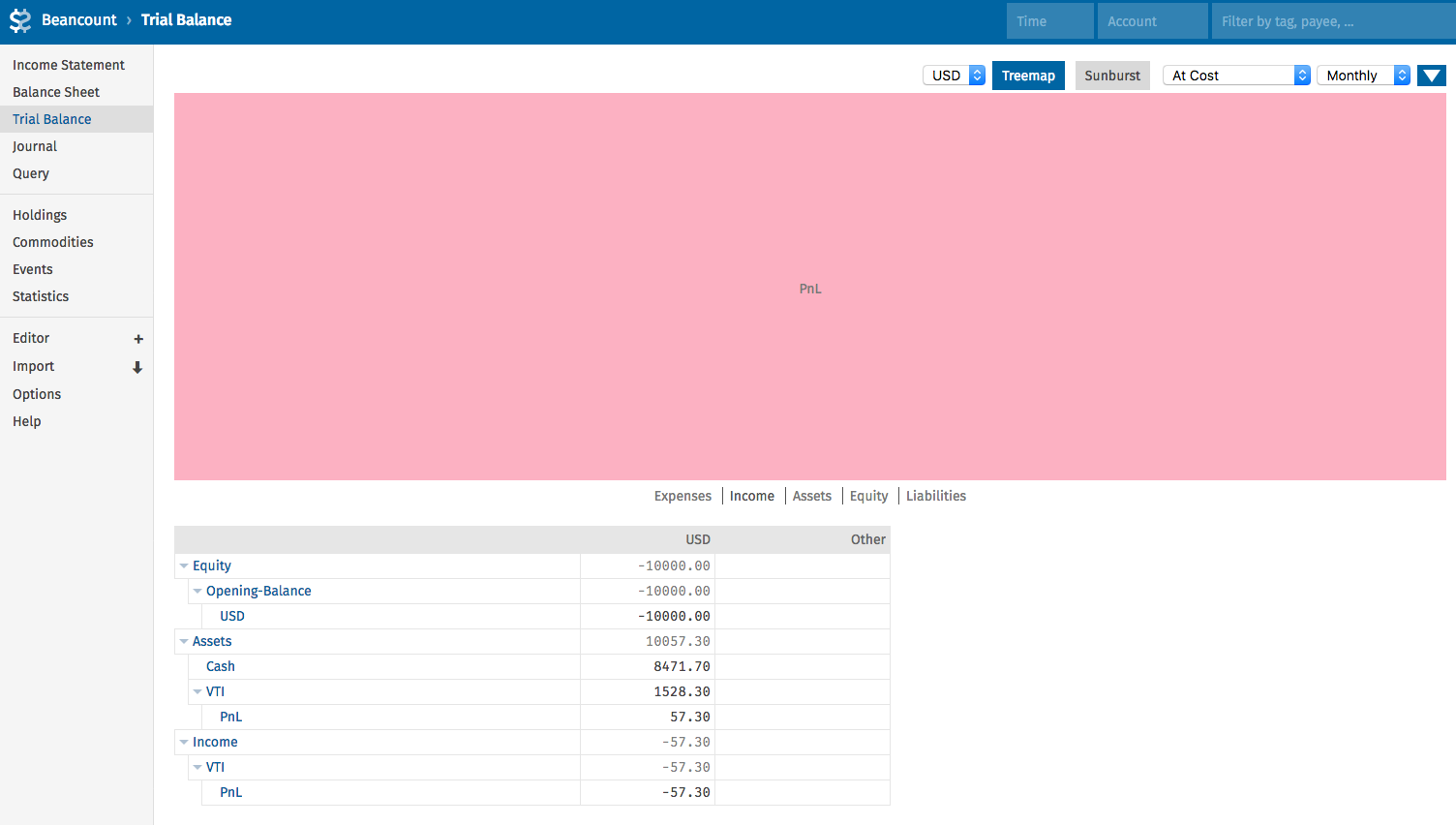
The final file will be:
> include “price.bean”
> option “operating\_currency” “USD”
> plugin “beancount.plugins.unrealized” “PnL”
> ; initiate VTI (=Fund) commodity
> 2019-01-01 commodity VTI
> price: “USD:yahoo/VTI”
> ; open USD, VTI & PnL Accounts
> 2018-01-01 open Assets:VTI VTI
> 2018-01-01 open Assets:VTI:PnL USD
> 2018-01-01 open Assets:Cash USD
> ; open the money press
> 1970-01-01 open Equity:Opening-Balance:USD USD
> ; give me some toy-money
> 2018-12-31 pad Assets:Cash Equity:Opening-Balance:USD
> 2019-01-01 balance Assets:Cash 10000.00 USD
> ;Some VTI we bough a while ago
> 2019-07-11 \* “IB” “Buying some VTI for test purpose”
> Assets:VTI 10 VTI { 152.83 USD}
> Assets:Cash
The results in next post 😉
---
### Author:  [@Tino](https://forum.mustachianpost.com/u/Tino)
#### Post date: [November 20, 2019, 4:05pm UTC](https://forum.mustachianpost.com/t/beancount-advancement-thread/2786/3 "2019-11-20T16:05:59Z")
Now, there are thousand of commands with bean-query, etc… to do with your data but I use fava, so… from your example, the results:
Your program:
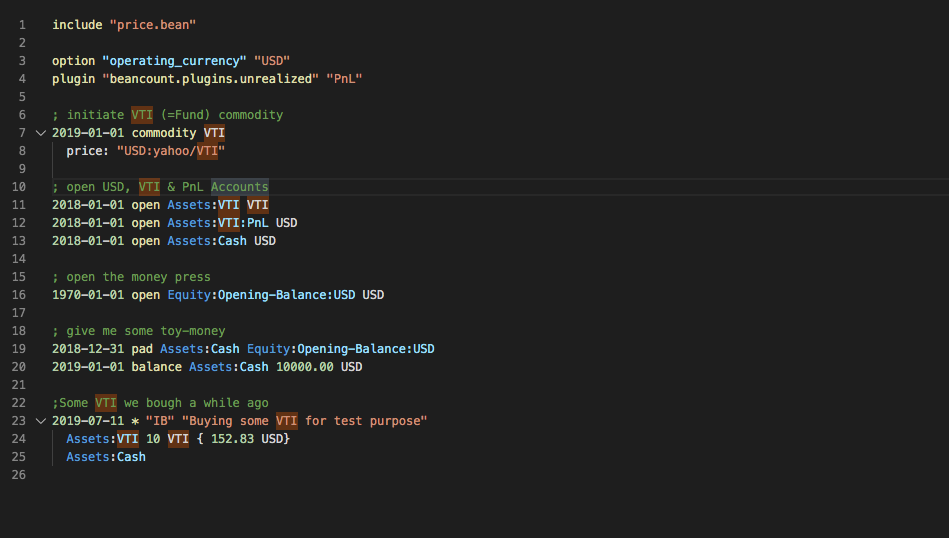
The [http://localhost:5000](http://localhost:5000) : The income Statement
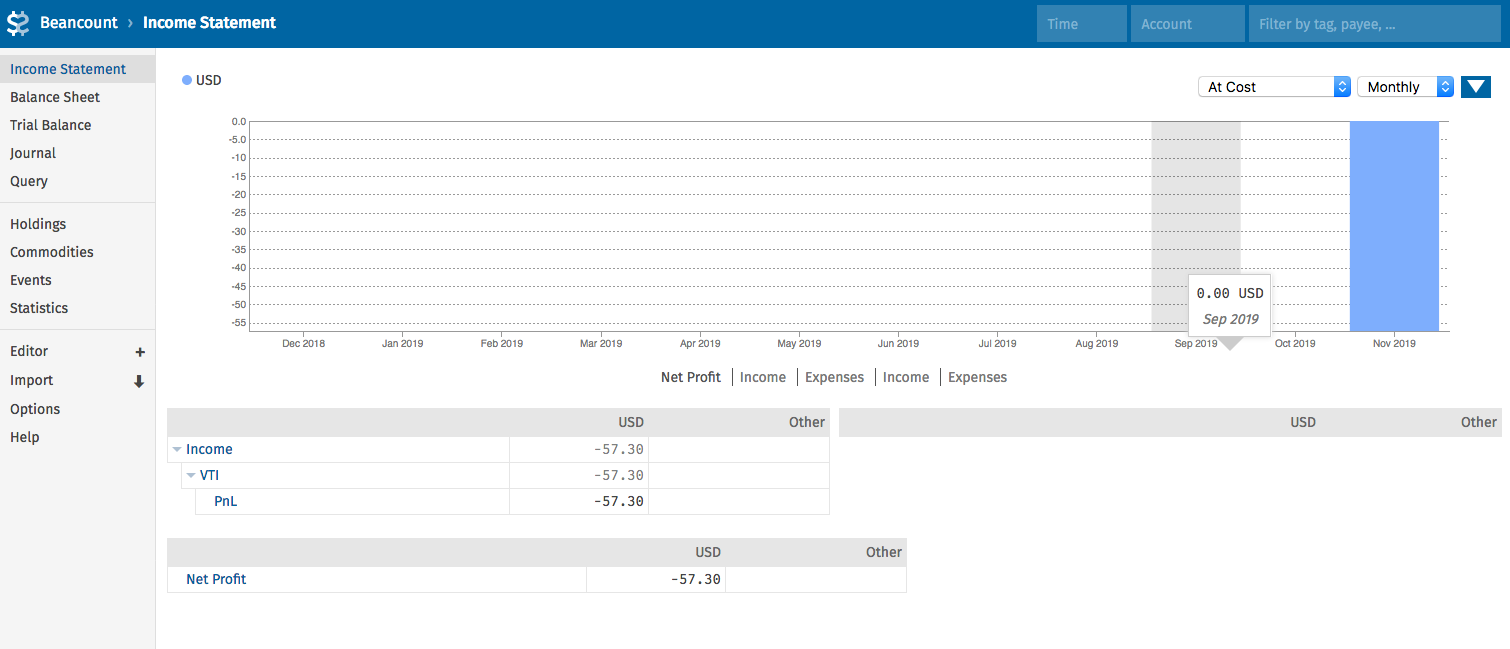
A nice balance Sheet:
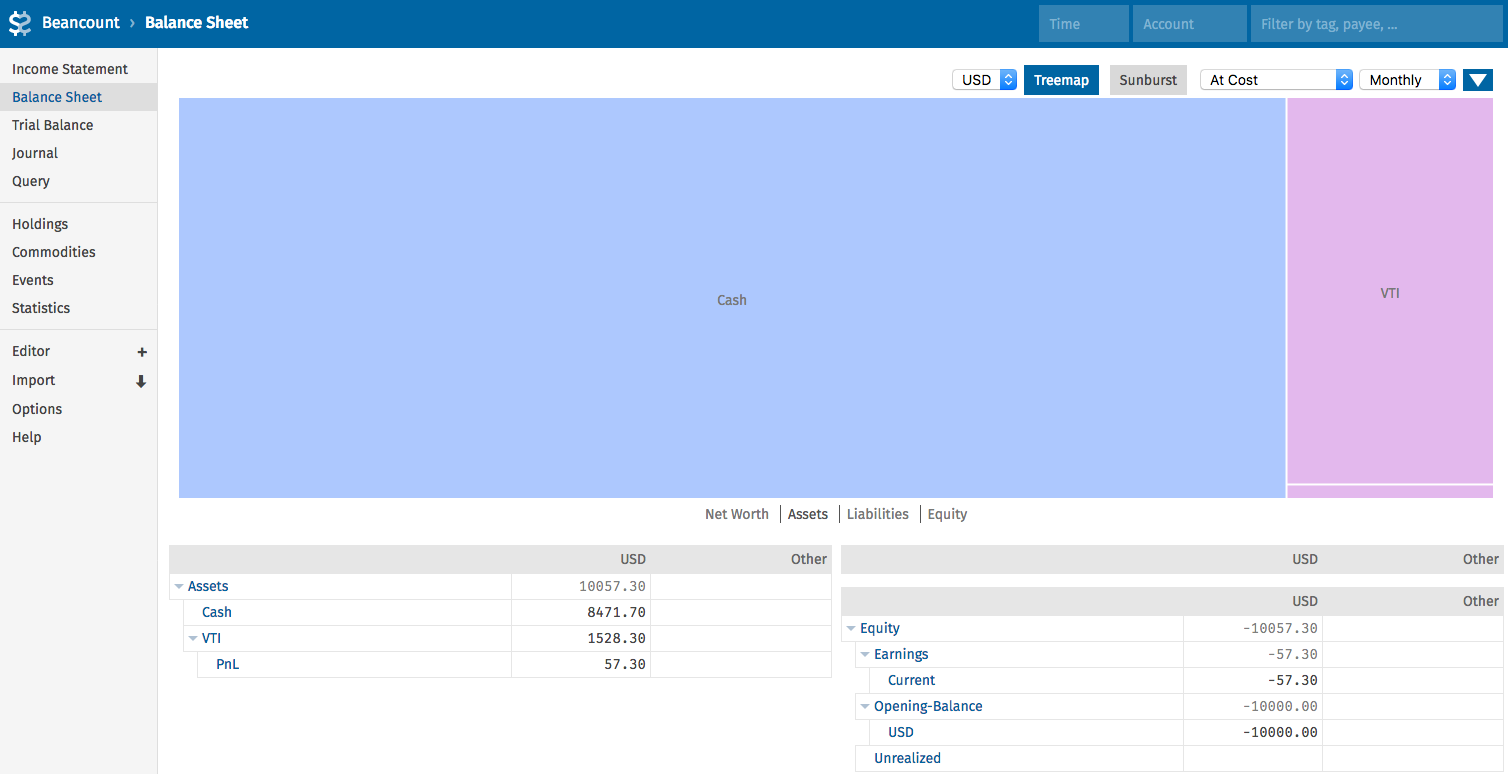
The Trial Balance:
The journal:

Modifying because a mistake… 😉

I used the account Casssh that doesn’t exist:
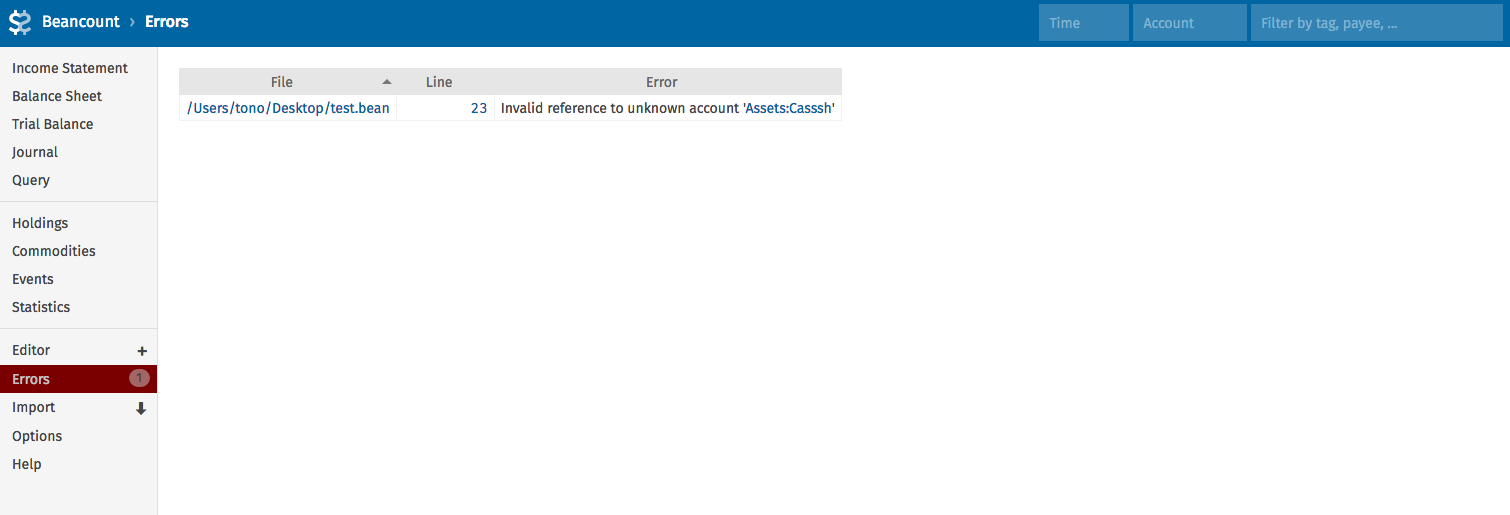
Editing the coplete file: Note the proposal for the correct account:
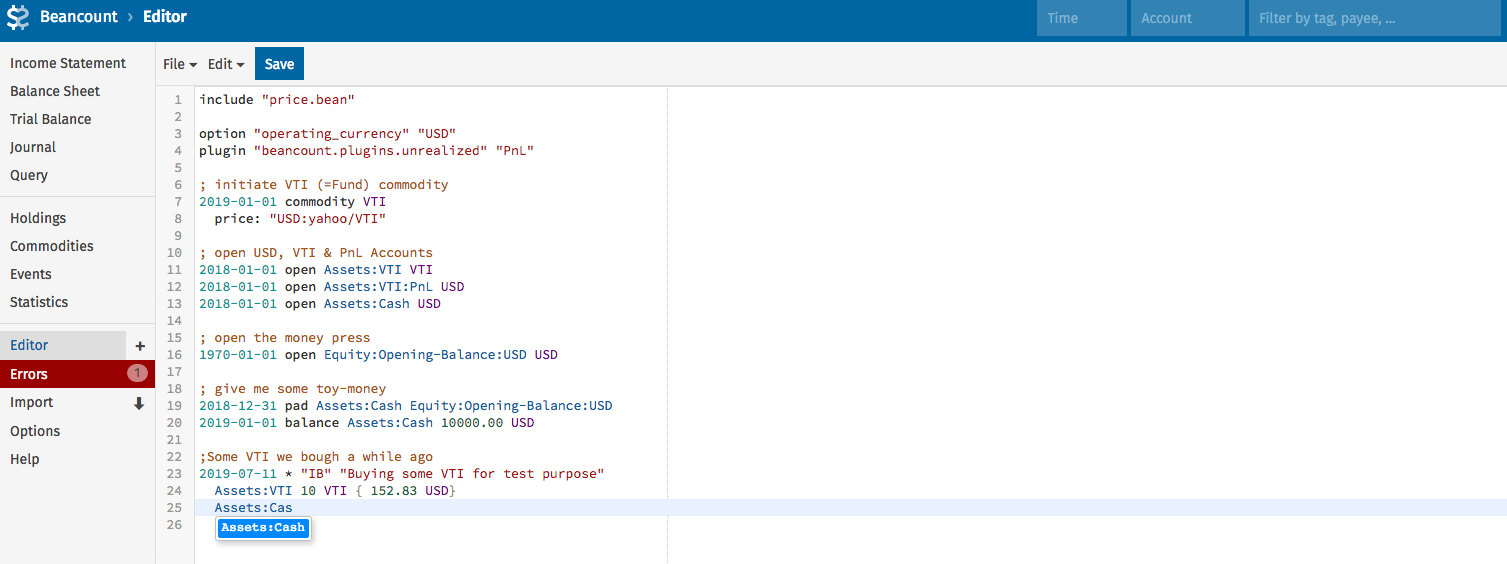
Etc…etc… There are hundred of reports, edits, doing queries…everything.
Regards.
---
### Author:  [@Tino](https://forum.mustachianpost.com/u/Tino)
#### Post date: [November 20, 2019, 4:08pm UTC](https://forum.mustachianpost.com/t/beancount-advancement-thread/2786/4 "2019-11-20T16:08:25Z")
BTW, when you run
> ~/Desktop $ bean-price test.bean \>\> price.bean
the file price.bean finish with:
> ~/Desktop cat price.bean 2019-11-20 price VTI 158.56 USD tono@iMac ~/Desktop
---
### Author:  [@nugget](https://forum.mustachianpost.com/u/nugget)
#### Post date: [November 20, 2019, 4:24pm UTC](https://forum.mustachianpost.com/t/beancount-advancement-thread/2786/5 "2019-11-20T16:24:32Z")
Hey Tino,
big time thanks
VSCode & plugins and Fava i had running already, but the rest is really helpful! especially the file organization with the prices file. and let me guess: you would have some crono-job or whenever you log on fetching latest prices?^^
> > the file price.bean finish with:
> > for me, the file looks quite sterile:
> >
> > 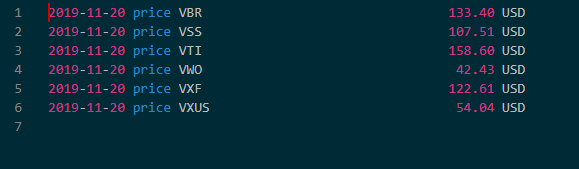
> > but perfect as such.
and let me guess: you have the main. bean for all the set-up of accounts, commodities, options etc, and all the transactions in one file per year, and then with you bean.main a section with
> include 2019.bean ; \<= adding current transactions here
> include 2018.bean
> include 2017.bean
> …
thanks, more questinos coming 😉
---
### Author:  [@Tino](https://forum.mustachianpost.com/u/Tino)
#### Post date: [November 20, 2019, 5:42pm UTC](https://forum.mustachianpost.com/t/beancount-advancement-thread/2786/6 "2019-11-20T17:42:10Z")
> [@nugget](#):
>
> the file looks quite sterile:
Yes… you must run everyday/week… I run automatically with a cron everyday.
At the beginning you don’t have any price so you can run (I did):
> bean-price -d 2019-08-01 test.bean \>\> price.bean
> bean-price -d 2019-09-01 test.bean \>\> price.bean
> bean-price -d 2019-10-01 test.bean \>\> price.bean
> etc.
beancount will check your file and **if needed** will write the prices.
I remark the if needed because if you run with 2019-01-01 since you didn’t have the stocks … there is not going to show any price!!! I became crazy until I discovered 😉
The final file is:
> ~/Desktop $ tail price.bean
> 2019-11-20 price VTI 158.56 USD
> 2019-08-01 price VTI 150.80 USD
> 2019-08-30 price VTI 149.04 USD
> include 2019.bean ; \<= adding current transactions here
Exactly, for the groceries in Migros I do in 2019.bean. When there is some movements in P2P…in the file p2p.bean, when I buy stocks, in ib.bean or td.bean or e.g. broker.bean.
The point is split the big file in some subfiles because if not…is crazy editing a file with 10000 lines!!!
---
### Author:  [@MeowMeowFuzzyface](https://forum.mustachianpost.com/u/MeowMeowFuzzyface)
#### Post date: [November 20, 2019, 6:07pm UTC](https://forum.mustachianpost.com/t/beancount-advancement-thread/2786/7 "2019-11-20T18:07:22Z")
Maybe we can start a shared google doc?
So we got all the know-how in one file with a toc 🙂
---
### Author:  [@nugget](https://forum.mustachianpost.com/u/nugget)
#### Post date: [November 20, 2019, 7:43pm UTC](https://forum.mustachianpost.com/t/beancount-advancement-thread/2786/8 "2019-11-20T19:43:14Z")
I’d love that 😍
check out this:
> **[nugget's public Beancount Knowledge boost](https://docs.google.com/document/d/1DQTaiN0W9EtZB4n4jgXlPZMMV8LhT3wIEPrS9G2Qops/edit?usp=sharing)**
>
> nugget's public Beancount Knowledge boost Please add here content that might help others to get started with Beancount. Let’s try to make a valuable document! Always keep in mind the original documentation from Martin Blais. Getting Started...
it is yet publicly editable, we can think about this later
---
### Author:  [@nugget](https://forum.mustachianpost.com/u/nugget)
#### Post date: [November 20, 2019, 9:00pm UTC](https://forum.mustachianpost.com/t/beancount-advancement-thread/2786/9 "2019-11-20T21:00:38Z")
How do you guys do/ use code folding?
for me it looks like
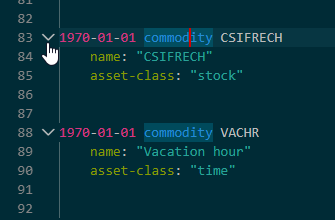
do you fold for example all account openings, salaries, investmen stuf… ?
---
### Author:  [@MeowMeowFuzzyface](https://forum.mustachianpost.com/u/MeowMeowFuzzyface)
#### Post date: [November 20, 2019, 9:05pm UTC](https://forum.mustachianpost.com/t/beancount-advancement-thread/2786/10 "2019-11-20T21:05:35Z")
I added some importers to the google doc.
---
### Author:  [@Tino](https://forum.mustachianpost.com/u/Tino)
#### Post date: [November 20, 2019, 9:24pm UTC](https://forum.mustachianpost.com/t/beancount-advancement-thread/2786/11 "2019-11-20T21:24:11Z")
> [@nugget](#):
>
> do you fold for example all account openings, salaries, investmen stuf… ?
Nope, no me.
Normally I don’t touch the file where all the definitions are done… Just the last 2019.bean or broker.bean
I know some people that even do a 2019-01.bean 2019-02.bean and so on… I think is too much.
Another free advice 😉 Tag **every** entry, **every one**! At least until beancount implements the pivot tables system! Since there is not done, I do, e.g.:
```
2019-11-14 * "IB" "Buy CSCO Cisco" #Stock #Buy #CSCO
Assets:Stock:CSCO 100 CSCO {45.00 USD}
Expenses:Commission:IB 0.67 USD
Assets:IB
2019-11-14 * "IB" "Compra RIO Rio Tinto" #Stock #Buy #WDC
Assets:Stock:RIO 100 RIO {52.7685 USD}
Expenses:Commission:IB 0.37 USD
Assets:IB
2019-11-15 * "TD" "Bought 10 WDC @ 52.70" #Stock #Buy #WDC
Assets:Stock:WDC 10 WDC { 50.70 USD}
Expenses:Commission:TD 0.00 USD
Assets:TD
2019-11-20 * "LIDL" "Buy Eggs and Wine" #Lidl #Buy #Eggs #Wine
AssetsUBS -29.65 CHF
Expenses:Groceries
2019-11-20 * "Migros" "Buy Milk" #Migros #Buy #Milk
Assets:UBS -6.05 CHF
Expenses:Grocery
```
Later I can “cross” data … knowing, e.g. how much I spent in October Buying Milk … or How much I spend buying RIO stocks last year, or the commission **only** in IB or IB + Some stock…etc… In fava is really easy.
Otherwise you must create hundred of accounts and is a nightmare.
---
### Author:  [@nugget](https://forum.mustachianpost.com/u/nugget)
#### Post date: [November 20, 2019, 9:52pm UTC](https://forum.mustachianpost.com/t/beancount-advancement-thread/2786/12 "2019-11-20T21:52:24Z")
> [@Tino](#):
>
> Another free advice 😉 Tag **every** entry, **every one**!
this was my initial reason why i wanted something new than Gnucash, because my train ticket can only go to the SBB account or my Skiing trip account, but not be reflected in both in a good way
---
### Author:  [@nugget](https://forum.mustachianpost.com/u/nugget)
#### Post date: [November 21, 2019, 10:29am UTC](https://forum.mustachianpost.com/t/beancount-advancement-thread/2786/14 "2019-11-21T10:29:37Z")
Next technical question: I try using the beancount-DKB importer from
[https://github.com/siddhantgoel/beancount-dkb](https://github.com/siddhantgoel/beancount-dkb). however: after installing the command is not known:
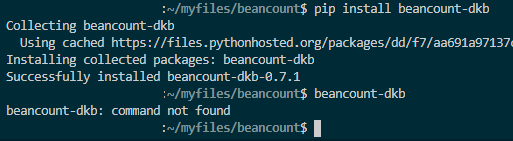
(I installed poetry successfully)
can anyone help me here? I.e. a working minimal example? I got the DKB .csv ready for processing. thanks!
---
### Author:  [@nugget](https://forum.mustachianpost.com/u/nugget)
#### Post date: [November 21, 2019, 11:32am UTC](https://forum.mustachianpost.com/t/beancount-advancement-thread/2786/15 "2019-11-21T11:32:52Z")
now turnign to beans, since I’d like to use the importer of IB and Postfinance.
going after the manual [The beans manual](https://sboehler.github.io/beans/)
after cloning the reop, i am stuck with
> ~/myfiles/beans$ stack install
> error: attribute ‘ghc863’ missing, at (string):1:48
> (use ‘–show-trace’ to show detailed location information)
> ~/myfiles/beans$ --show trace
> –show: command not found
> ~/myfiles/beans$ stack -show trace
> Invalid option `–show’
>
> Usage: stack [–help] [–version] [–numeric-version] [–hpack-numeric-version]
> [–docker\*] [–nix\*] ([–verbosity VERBOSITY] | [-v|–verbose] |
> [–silent]) [–[no-]time-in-log] [–stack-root STACK-ROOT]
> [–work-dir WORK-DIR] [–[no-]system-ghc] [–[no-]install-ghc]
> [–arch ARCH] [–ghc-variant VARIANT] [–ghc-build BUILD]
> [-j|–jobs JOBS] [–extra-include-dirs DIR] [–extra-lib-dirs DIR]
> [–with-gcc PATH-TO-GCC] [–with-hpack HPACK]
> [–[no-]skip-ghc-check] [–[no-]skip-msys] [–local-bin-path DIR]
> [–[no-]modify-code-page] [–[no-]allow-different-user]
> [–[no-]dump-logs] [–color|–colour WHEN] [–resolver RESOLVER]
> [–compiler COMPILER] [–[no-]terminal]
> [–stack-colors|–stack-colours STYLES] [–terminal-width INT]
> [–stack-yaml STACK-YAML] [–lock-file ARG] COMMAND|FILE
>
> ~/myfiles/beans$ stack init
> Control.Exception.Safe.throwString called with:
>
> Error: Stack configuration file stack.yaml exists, use ‘–force’ to overwrite it.
> Called from:
> throwString (src/Stack/Init.hs:62:9 in stack-2.1.3-HEoMsL9gvgt2vNexTWWwGx:Stack.Init)
i found some recources but none of them make any sense to my unix beginner’s mind:
> **[Haskell stack not working after upgrade to 19.03](https://discourse.nixos.org/t/haskell-stack-not-working-after-upgrade-to-19-03/2687/3)**
>
> I think haskell.compiler.ghc863 was removed from nixpkgs. You may want to use a stack resolver that points to ghc864.
> **[What can I do if a tag is no longer available?](https://discourse.nixos.org/t/what-can-i-do-if-a-tag-is-no-longer-available/2449/2)**
>
> I think I found a solution, went back to ghc844 (lts-12.20) and am using the wrapper version of hie. I can avoid this problem for now, but it’s still unclear to me what to do about a tag that goes missing.
further, installing nix gives a ton of stdout, ending with error:
> …
> mkdir: cannot create directory ‘/build’: Permission denied
> builder for ‘/nix/store/h4l3nlzi57dz3x377w69bzv5kwvp0fml-beans-0.0.4.0.drv’ failed with exit code 1
> error: build of ‘/nix/store/h4l3nlzi57dz3x377w69bzv5kwvp0fml-beans-0.0.4.0.drv’ failed
> ~/myfiles/beans$ sudo nix-build --attr beans release.nix
> [sudo] password for user:
> sudo: nix-build: command not found
anybody here who can help me set up & run the IB and Postfinance importer?
---
### Author:  [@ma0](https://forum.mustachianpost.com/u/ma0)
#### Post date: [November 21, 2019, 12:15pm UTC](https://forum.mustachianpost.com/t/beancount-advancement-thread/2786/16 "2019-11-21T12:15:37Z")
gosh beancount seeem so complex. If I have to hack around so much I’d prefer to write my own software then. … nutcount 🙂
The only hard part I see is the web-based viewer.
---
### Author:  [@nugget](https://forum.mustachianpost.com/u/nugget)
#### Post date: [November 21, 2019, 12:18pm UTC](https://forum.mustachianpost.com/t/beancount-advancement-thread/2786/17 "2019-11-21T12:18:57Z")
you are right, the whole beancount project became totally unmustacian already from the time i invested. if you are not a UNIX pro, the pain is huge 🤮
however there are some rewarding moments…
---
### Author:  [@ma0](https://forum.mustachianpost.com/u/ma0)
#### Post date: [November 21, 2019, 12:33pm UTC](https://forum.mustachianpost.com/t/beancount-advancement-thread/2786/18 "2019-11-21T12:33:12Z")
I so want to try it just to be able to remake it. It doesn’t seem that complex to me. It has some good plugin architecture probably and many people contributed to essential plugins. The basics, though, seems to be a tool where you can create a list of categories and then use them to categorize your stuff.
---
### Author:  [@Tino](https://forum.mustachianpost.com/u/Tino)
#### Post date: [November 21, 2019, 1:20pm UTC](https://forum.mustachianpost.com/t/beancount-advancement-thread/2786/19 "2019-11-21T13:20:03Z")
Well guys, the problem is that you start “big” with not too much knowledge… like me 😉
Now, some time later I don’t use importers or complicate things.
I spent hours, days! trying to configure importers, exporters, accounts, etc… and I stopped.
I did by hand… You have 1000 lines to import? You can do 100 per week? In 10 weeks is done. You are not in a hurry since you stay putting new movements in the files.
I used a simple system:
1. Export all to CSV
2. Pass all to a spreadsheet.
3. Figure out how to put all in columns like: 2019-11-21 \* “Payee” “Literature” ++++ Assets:Account ##### 21 CHF …
4. Copy and paste everything in VSCode
5. Use the magnifico, beautiful, top tool that put the cursor in every “++++” or “####” you find in the text and I do: “Enter”.
6. The magic comes, because when you find ++++ means that you have to do another line, you can erase all the ++++ in one shot…etc.
I did like that 1000, 2000 lines from UBS or IB in one hour. Don’t spend time with importers, there is nothing completely plug-and-play
---
### Author:  [@Tino](https://forum.mustachianpost.com/u/Tino)
#### Post date: [November 21, 2019, 1:52pm UTC](https://forum.mustachianpost.com/t/beancount-advancement-thread/2786/20 "2019-11-21T13:52:10Z")
Well… I don’t have time to do a video or explain better… Hope with that is enough.
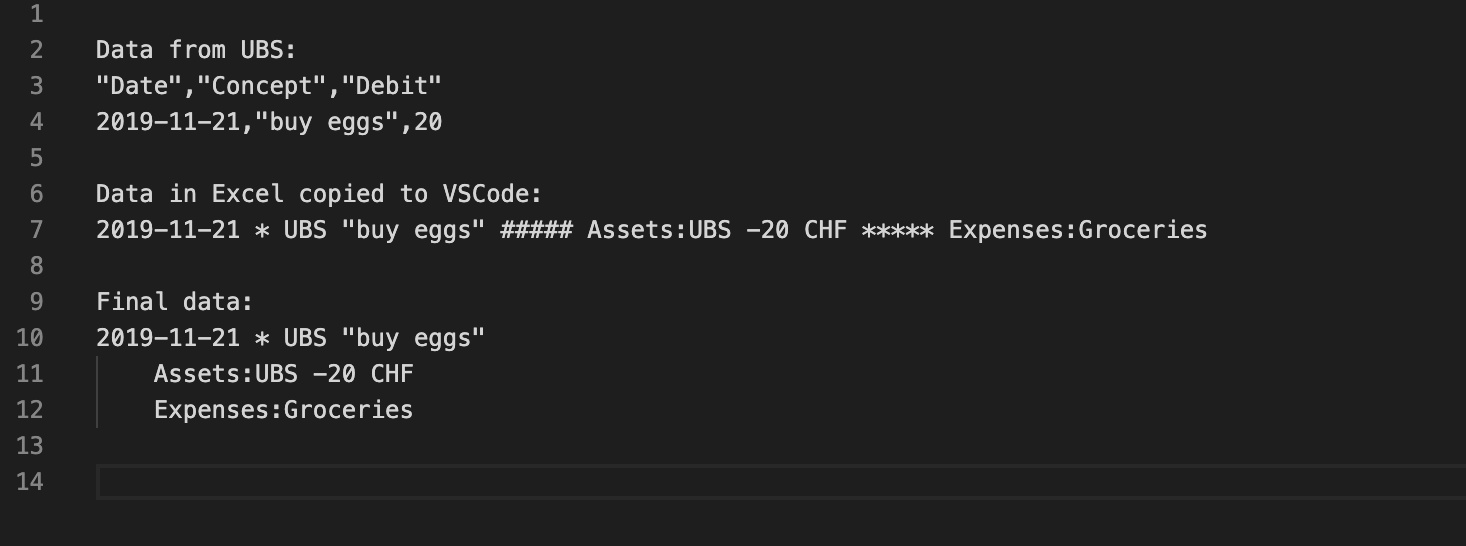
1. You’ll get from the bank the lines 3 and 4 in a CSV file
2. You import this file in Excel or whatever spreadsheet and **find out** how to finish your data like in the line 7
3. You copy the text from Excel to VS as you see in line 7
4. You select whatever token you used in line 7… in my example “#####” and in mac, press Command+F2 or “Change All Occurrences” All the “#####” will become blue and thousand of cursors will be in your text.
5. You put the cursor in the first ##### and press Enter + TAB and Erase the ##### token used to have the line 11. Later you do the same with the token \*\*\*\*\* and make the line 12.
---
### Author:  [@nugget](https://forum.mustachianpost.com/u/nugget)
#### Post date: [November 21, 2019, 11:38pm UTC](https://forum.mustachianpost.com/t/beancount-advancement-thread/2786/22 "2019-11-21T23:38:52Z")
simply beautiful. and with abit of excel skill, this is quite scalable. thanks for the hint! i got lost in all that parser stuff.
[Next page](https://forum.mustachianpost.com/t/beancount-advancement-thread/2786.md?page=2)